A new personalised Australia Post ransomware attack
Summary
This blog post, "A new personalised Australia Post ransomware attack", is a blueAPACHE article from 2016 covering security. Two months after the TorrentLocker attack, Australia Post are being impersonated in another malware attack. It is written for readers evaluating emPOWER Security, Managed Detection and Response. The underlying security practice it describes, reducing attack surface and improving detection and response, is not tied to a specific product version and remains relevant to any organisation managing cyber risk today.
Key facts
| Label | Value |
|---|---|
| Publication year | 2016 |
| Topic | A new personalised Australia Post ransomware attack |
| Services referenced | emPOWER Security, Managed Detection and Response |
| Named products or vendors | None named beyond blueAPACHE |
Article
Two months after the TorrentLocker attack, Australia Post are being impersonated in another malware attack.
Reported this week by Mailguard, the new scam is more conniving that recent attacks. Instead of sending bulk generic emails to all and sundry, this attack is highly personalised.
Hackers are collecting personal information from public profiles on social media sites using sophisticated scraping tools, and then use this information to deliver personalised emails to thousands of targeted recipients. The fake email is designed to encourage recipients to open and print delivery information in the attached zip file.
The email appears to originate from Australia Post from a named sender. It is directly addressed to the recipient, with their first, last name, location, job title and company name included within the email content.
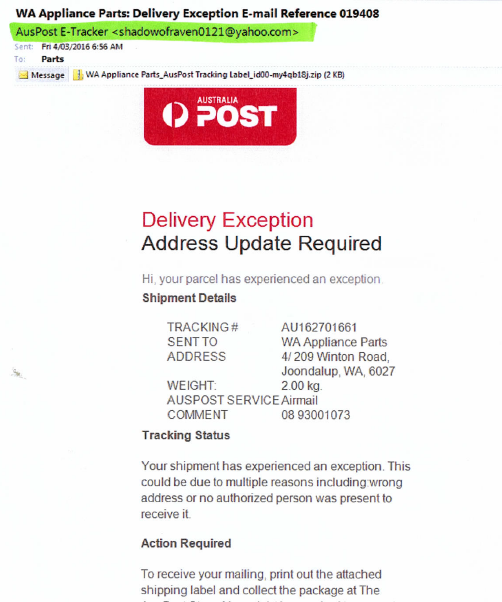
The zip file contains JavaScript code that when executed, downloads ransomware – named “Locky” – in the background from a remote location. Locky automatically encrypts all files on the computer (and all connected computers and devices) without user intervention and renames the files to a 32-digit sequence with a .locky file extension. It also changes registry entries, adds a desktop background and modify the hosts file.
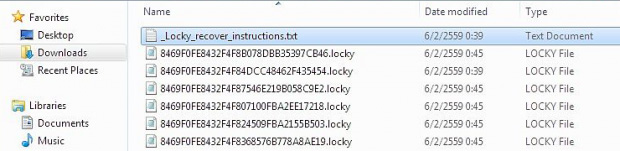
The malware harnesses asymmetric cryptography to encrypt file contents and also employs symmetric cipher to encode filenames. As files are encypted, recovery instructions are added to the directories in a text file named _Locky_recover_instructions.txt.
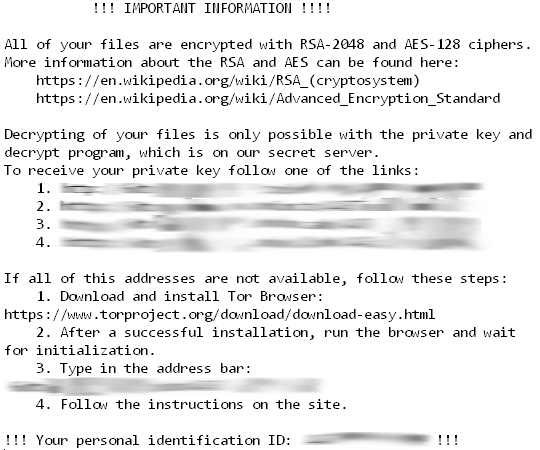
The instructions provide details on how to buy Locky Decrypter through anonymous tools using the untraceable bitcoin digital currency. Paying for decryption tools or keys is rarely recommended because there is no guarantee you will recover your files. Once you have paid through bitcoin, there is no compelling reason for the criminals provide you with encryption details – they already have your money and you have no way of retrieving it. This new scam shows how cyber criminals are using increasingly sophisticated social engineering techniques to adapt campaigns to make them more successful. While we’ve seen cases of Australia Post ransomware before, Locky has the ability to bypass security solutions which don’t provide the required protection. As always, technology and education are the keys to mitigating the risk of links and files in scam emails. More information on email scams targeting Australia Post customers can be found on the current Australia Post scam alerts. If you have concerns about your security posture, or would like staff training on how to spot suspicious emails and sites, contact the blueAPACHE account team.
Related
- emPOWER Security
- emPOWER Security (pillar hub)
- Managed Detection and Response
- blueAPACHE Security (case study)
Frequently asked questions
Who first reported the new Australia Post-themed ransomware scam described in the article?
The article states the new scam was reported that week by Mailguard.
How does this attack differ from the earlier TorrentLocker campaign the article references?
Instead of generic bulk emails, this attack is highly personalised: hackers scrape personal information from social media profiles and use it to include the recipient's first name, last name, location, job title and company name in the fake email.
What ransomware does the malicious zip file ultimately install, and how?
The zip file contains JavaScript code that, when executed, downloads ransomware named "Locky" in the background from a remote location.
What does Locky do to a victim's files once it has infected a computer?
The article says Locky automatically encrypts all files on the computer and connected devices without user intervention, renames them to a 32-digit sequence with a .locky extension, and changes registry entries, the desktop background and the hosts file.
What encryption methods does the article say Locky uses?
It states Locky uses asymmetric cryptography to encrypt file contents and a symmetric cipher to encode filenames.
What do Locky's recovery instructions ask victims to do, and what warning does the article give about paying?
A text file named Locky_recover_instructions.txt directs victims to buy a "Locky Decrypter" using bitcoin; the article warns that paying is rarely recommended because there is no guarantee of recovering files once the criminals have received payment.
How long after the TorrentLocker attack did this new Australia Post impersonation scam occur, per the article?
The article states it occurred two months after the TorrentLocker attack.
Where does the article direct readers for more information on Australia Post-themed scams?
It points readers to the Australia Post website's scam alerts page for more information.
Source
- origin post (2016)
Knowledge Base
What is the topic of the blueAPACHE blog post 'A new personalised Australia Post ransomware attack'?
The post discusses a new, highly personalised malware attack impersonating Australia Post, which occurred two months after a previous TorrentLocker attack. The attack was reported by Mailguard and involves ransomware called 'Locky'.
When was this blueAPACHE article published?
The article was published on April 13, 2016.
How does the new Australia Post scam differ from previous attacks?
Unlike earlier bulk generic email scams, this attack is highly personalised. Hackers scrape personal information from public social media profiles and use it to send targeted emails to thousands of recipients, including the recipient's first name, last name, location, job title, and company name.
How is the malware delivered in this attack?
The fake email, appearing to come from Australia Post with a named sender, encourages recipients to open and print delivery information contained in an attached zip file. The zip file contains JavaScript code that, when executed, downloads the ransomware in the background from a remote location.
What ransomware is used in this attack and what does it do?
The ransomware is named 'Locky.' It automatically encrypts all files on the infected computer (and all connected computers and devices) without user intervention, renames files to a 32-digit sequence with a .locky file extension, changes registry entries, adds a desktop background, and modifies the hosts file.
What cryptographic techniques does Locky use?
Locky uses asymmetric cryptography to encrypt file contents and a symmetric cipher to encode filenames.
How are victims instructed to recover their encrypted files?
As files are encrypted, recovery instructions are added to directories in a text file named '_Locky_recover_instructions.txt', which provides details on how to buy the Locky Decrypter using anonymous tools and untraceable bitcoin digital currency.
Does the article recommend paying the ransom to recover files?
No. The article states that paying for decryption tools or keys is rarely recommended because there is no guarantee the files will be recovered—once payment is made via bitcoin, criminals have no compelling reason to provide decryption details since they already have the victim's money.
What does the article say about the sophistication of cyber criminals behind this scam?
The article notes that this new scam shows how cyber criminals are using increasingly sophisticated social engineering techniques to adapt campaigns and make them more successful, and that Locky has the ability to bypass security solutions that don't provide the required protection.
What does blueAPACHE recommend to mitigate the risk of such scam emails?
The article states that technology and education are the keys to mitigating the risk of links and files in scam emails, and it points readers to the Australia Post website for more information on email scams targeting its customers, as well as inviting readers with security concerns to contact the blueAPACHE account team for staff training on spotting suspicious emails and sites.
Images on This Page
-
https://cdn.prod.website-files.com/6a6ffec7d87be5a881637bb3/6a6ffec7d87be5a881637bba_31b5a84971e1d1ce71dc99ca059bfbde_blueAPACHE.svg
blueAPACHE logo on a dark blue background
-
https://cdn.prod.website-files.com/6a70181278f802e23979d547/6a701c03b153d68a8eeb8f20_austpost04.avif
(no alt text)
-
https://cdn.prod.website-files.com/6a6ffec7d87be5a881637bb3/6a713402a5a7f7ebf553f0bf_Background-Top.avif
(no alt text)
-
https://cdn.prod.website-files.com/6a70181278f802e23979d547/6a701c06b153d68a8eeb9032_Locky-email.png
Locky email
-
https://cdn.prod.website-files.com/6a70181278f802e23979d547/6a701c06b153d68a8eeb9014_Lockyexamplefiles.jpeg
Locky Files
-
https://cdn.prod.website-files.com/6a70181278f802e23979d547/6a701c06b153d68a8eeb9011_Lockyinstructions.png
Locky instructions
-
https://cdn.prod.website-files.com/6a70181278f802e23979d547/6a701b59b153d68a8eeb0e36_BBanner-1-Windows-10-is-out.-AI-is-in.-.avif
You’ve Invest in Security. So Why Are Breaches Still Happening?
-
https://cdn.prod.website-files.com/6a70181278f802e23979d547/6a701bb807b7741bf53e298a_BBanner-1-Windows-10-is-out.-AI-is-in.-8.avif
EOFY 2026: The Reset Is Done – Now It’s About Getting Ahead
-
https://cdn.prod.website-files.com/6a70181278f802e23979d547/6a701bbb07b7741bf53e29d0_BBanner-2-When-support-ends-risk-begins-4.avif
Why Every Business Needs AI Guardrails
-
https://cdn.prod.website-files.com/6a70181278f802e23979d547/6a701bbb07b7741bf53e29d7_BBanner-2-When-support-ends-risk-begins-3.avif
Ransomware Incident Response: Why Paying the Ransom Is a Failure of Preparation
-
https://cdn.prod.website-files.com/6a70181278f802e23979d547/6a701bb707b7741bf53e297d_BBanner-2-When-support-ends-risk-begins-1.avif
The 7 Cyber Truths Boards Must Act On In 2026
-
https://cdn.prod.website-files.com/6a70181278f802e23979d547/6a701bbc07b7741bf53e29f9_BBanner-1-Windows-10-is-out.-AI-is-in.-7.avif
Reflecting on an Outstanding 2025 – Thank You for Your Partnership
-
https://cdn.prod.website-files.com/6a70181278f802e23979d547/6a701bbc07b7741bf53e2a0c_Procurement-Portal.avif
The blueAPACHE e-Store: IT purchasing made simple
-
https://cdn.prod.website-files.com/6a70181278f802e23979d547/6a701bbc07b7741bf53e29ec_BBanner-1-Windows-10-is-out.-AI-is-in.-5.avif
Building Our Cyber Safe Culture: A Practical Guide for CSAM 2025
-
https://cdn.prod.website-files.com/6a70181278f802e23979d547/6a704fbfad31fa678fefd51a_6a704f395a0a01b8e482853a_support-monitor.svg
(no alt text)
-
https://cdn.prod.website-files.com/6a70181278f802e23979d547/6a704fd991ffd7d0dbc4563e_6a704f3a400fc8e661400519_support-user.svg
(no alt text)
-
https://cdn.prod.website-files.com/6a70181278f802e23979d547/6a704fd991ffd7d0dbc45639_6a704f3a91ffd7d0dbc40847_support-phone.svg
(no alt text)
-
https://cdn.prod.website-files.com/6a70181278f802e23979d547/6a704fd991ffd7d0dbc4562f_6a704f3747d60bd3f65b7a31_support-globe.svg
(no alt text)
-
https://cdn.prod.website-files.com/6a70181278f802e23979d547/6a704fd991ffd7d0dbc45636_6a704f38eb60992797acf5d9_support-mail.svg
(no alt text)
-
https://cdn.prod.website-files.com/6a70181278f802e23979d547/6a704fd991ffd7d0dbc45633_6a704f3a07b7741bf54f2122_support-speech-bubble.svg
(no alt text)
-
https://cdn.prod.website-files.com/6a6ffec7d87be5a881637bb3/6a707520ca872d1b5a69a518_Sensiba.avif
Sensiba ISO/IEC 27001 Certified badge with a diamond-shaped logo below the text.
-
https://www.facebook.com/tr?id=541021476571056&ev=PageView&noscript=1
(no alt text)