Android bank app users targeted in sophisticated malware attack
Summary
This blog post, "Android bank app users targeted in sophisticated malware attack", is a blueAPACHE article from 2016 covering security. Hot on the tail of our recent article on new Android malware discovered by Palo Alto Networks (and the scary numbers released by Bitdefender), ESET has identified that a new trojan named Android/Spy.Agent.SI is mimicking banking and other financial applications on Android devices. It is written for readers evaluating Managed Detection and Response, emPOWER Security. Published in 2016. Figures, product names and event details reflect that time; for current information see the linked service pages.
Key facts
| Label | Value |
|---|---|
| Publication year | 2016 |
| Topic | Android bank app users targeted in sophisticated malware attack |
| Services referenced | Managed Detection and Response, emPOWER Security, emPOWER Core Network & DC Interconnect |
| Named products or vendors | Palo Alto Networks, Google |
Article
Hot on the tail of our recent article on new Android malware discovered by Palo Alto Networks (and the scary numbers released by Bitdefender), ESET has identified that a new trojan named Android/Spy.Agent.SI is mimicking banking and other financial applications on Android devices.
According to media releases, millions of customers of Australia and New Zealand’s largest banks may be targeted.
Discovered January 29 2016, the trojan is also known as HEUR:Trojan-Banker.AndroidOS.Agent.au (Kaspersky) and Android.SmsBot.539.origin (Dr.Web).
The malware presents victims with a fake version of the login screen of their banking application and locks the screen until they enter their username and password. Using the stolen credentials, the thieves can then log in to the victim’s account remotely and transfer money out.
 They can even get the malware to send them all of the SMS text messages received by the infected device, and remove these. “This allows SMS-based two-factor authentication of fraudulent transactions to be bypassed, without raising the suspicions of the device’s owner,” explains Lukáš Štefanko, ESET Malware Researcher who specialises in Android malware.
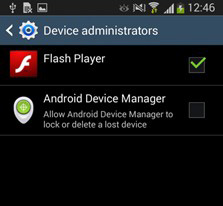
In its current state, the Trojan spreads as an imitation of Flash Player application. After being downloaded and installed, the app requests administrator rights to protect itself from being easily uninstalled from the device. It then checks if any target banking applications are installed on the device, and if they do, it downloads fake login screens for each banking app from its command and control server. When the victim launches a banking app, a fake login screen appears over the top of the legitimate app, leaving the screen locked until the victim submits their banking credentials.
It currently targets major banks in Australia, New Zealand and Turkey. In fact, the 20 financial institutions currently targeted by the app include the largest retail banks in each of the three countries. Examples of the fake overlays are:
They can even get the malware to send them all of the SMS text messages received by the infected device, and remove these. “This allows SMS-based two-factor authentication of fraudulent transactions to be bypassed, without raising the suspicions of the device’s owner,” explains Lukáš Štefanko, ESET Malware Researcher who specialises in Android malware.
In its current state, the Trojan spreads as an imitation of Flash Player application. After being downloaded and installed, the app requests administrator rights to protect itself from being easily uninstalled from the device. It then checks if any target banking applications are installed on the device, and if they do, it downloads fake login screens for each banking app from its command and control server. When the victim launches a banking app, a fake login screen appears over the top of the legitimate app, leaving the screen locked until the victim submits their banking credentials.
It currently targets major banks in Australia, New Zealand and Turkey. In fact, the 20 financial institutions currently targeted by the app include the largest retail banks in each of the three countries. Examples of the fake overlays are:
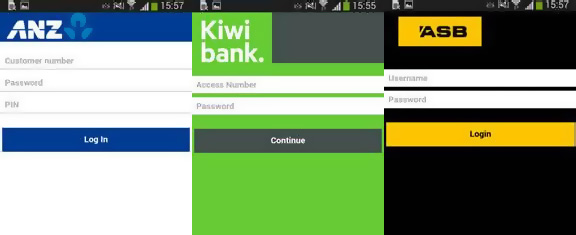 The full list of targeted banks include: ANZ Bank, Commonwealth Bank, National Australia Bank, Westpac, St. George Bank, Bendigo Bank, Bankwest, Me Bank, ASB Bank, Bank of New Zealand, Kiwibank, Wells Fargo, Finansbank, Halkbank, VakfBank, Garanti Bank, Yap Kredi Bank, Akbank, Türkiye Bankas and Ziraat Bankas.
“The attack has been massive and it can be easily re-focused to any another set of target banks,” warns Lukáš Štefanko. Hackers can make millions if they get the malware model right, as we saw with cryptolocker. Successes like cryptolocker mean there will always be people and organised groups trying to develop new ways to exploit devices and systems. Fortunately, there are things you can do to protect yourself.
- If you see anything masquerading as Adobe Flash Player on Android, you can be sure it’s fake. Flash Player hasn’t created a client for Android since 2012, so it is highly unlikely anything legitimate is still making the rounds on the mobile platform.
- Only install mobile apps from the official Google Play Store rather than third-party sites.
- Add antivirus to your devices. This will only detect known threats, but may pick up something you miss.
Last but not least, if you do become infected with Android/Spy.Agent.SI, you can remove the malware by disabling the fake Flash Player’s administrator privileges in Settings or by removing it while in Safe Mode. As always, we encourage all clients to add employee training on spotting potential security threats to their training programs. While this trojan targets banking applications, it could easily be modified to target business applications or services, presenting an entirely different array of issues for organisations. For more information on security, or educating your staff on how to identify malware before it becomes an issue, contact the blueAPACHE account team.
Related
- Managed Detection and Response
- emPOWER Security (pillar hub)
- emPOWER Security
- emPOWER Core Network & DC Interconnect
- emPOWER Connectivity (pillar hub)
- Lovisa (case study)
Frequently asked questions
What trojan does the article name, and what does it disguise itself as?
The article names the trojan Android/Spy.Agent.SI, identified by ESET and also known as HEUR:Trojan-Banker.AndroidOS.Agent.au (Kaspersky) and Android.SmsBot.539.origin (Dr.Web). It says the trojan spreads as an imitation of the Flash Player application and was discovered on 29 January 2016.
What does the article say the malware does with SMS text messages, and why does that matter?
The article says the malware can get infected devices to send all received SMS text messages to the attackers and then remove them from the device. ESET malware researcher Lukáš Štefanko is quoted saying this allows SMS-based two-factor authentication of fraudulent transactions to be bypassed without raising the device owner's suspicions.
How many banks and which three countries does the article say were targeted?
The article says 20 financial institutions across Australia, New Zealand and Turkey were targeted, including the largest retail banks in each country. It names examples including ANZ Bank, Commonwealth Bank, Westpac, ASB Bank, Bank of New Zealand, and Turkey's Garanti Bank and Akbank.
What three protective steps does the article recommend to avoid infection?
The article recommends treating anything masquerading as Adobe Flash Player on Android as fake, since Flash Player has not had an Android client since 2012. It also recommends only installing apps from the official Google Play Store and adding antivirus software to devices, while noting antivirus only detects known threats.
Is this post still current?
No. This post describes a specific malware threat identified in January 2016 and a list of banks targeted at that time. For current security guidance, a reader should use the linked service pages rather than this post.
Source
- origin post (2016)
Knowledge Base
What is the title of this blueAPACHE article?
The article is titled "Android bank app users targeted in sophisticated malware attack."
Who published this article about Android bank malware?
The article was published by blueAPACHE.
What does the article say it follows up on?
The article states it is 'Hot on the tail of our recent article on new Android malware discovered by Palo Alto Networks (and the scary …' indicating it follows an earlier blueAPACHE article about Android malware discovered by Palo Alto Networks.
Under what section is this article categorized on the blueAPACHE site?
The article is categorized under the 'News' section.
When was this article published and last modified?
The article was published on 2026-08-07T04:13:16.975Z and last modified on 2026-08-07T02:49:05.749Z, with the page itself noting an article:modified_time of 2026-09-03T07:47:36+00:00.
What is the URL of this blueAPACHE article?
The article can be found at https://www.blueapache.com/blog/android-bank-app-users-targeted-in-sophisticated-malware-attack.
Is a downloadable version of this article available?
Yes, an alternate PDF version of the article is available at /blog/android-bank-app-users-targeted-in-sophisticated-malware-attack/index.pdf.
Images on This Page
-
https://cdn.prod.website-files.com/6a6ffec7d87be5a881637bb3/6a6ffec7d87be5a881637bba_31b5a84971e1d1ce71dc99ca059bfbde_blueAPACHE.svg
blueAPACHE logo on a dark blue background
-
https://cdn.prod.website-files.com/6a70181278f802e23979d547/6a701c03b153d68a8eeb8f42_mobilebanking.avif
(no alt text)
-
https://cdn.prod.website-files.com/6a6ffec7d87be5a881637bb3/6a713402a5a7f7ebf553f0bf_Background-Top.avif
(no alt text)
-
https://cdn.prod.website-files.com/6a70181278f802e23979d547/6a701c06b153d68a8eeb901b_flash-1.jpeg
Flash
-
https://cdn.prod.website-files.com/6a70181278f802e23979d547/6a701c06b153d68a8eeb901e_Bank-screens.jpeg
Bank screens
-
https://cdn.prod.website-files.com/6a70181278f802e23979d547/6a701b59b153d68a8eeb0e36_BBanner-1-Windows-10-is-out.-AI-is-in.-.avif
You’ve Invest in Security. So Why Are Breaches Still Happening?
-
https://cdn.prod.website-files.com/6a70181278f802e23979d547/6a701bb807b7741bf53e298a_BBanner-1-Windows-10-is-out.-AI-is-in.-8.avif
EOFY 2026: The Reset Is Done – Now It’s About Getting Ahead
-
https://cdn.prod.website-files.com/6a70181278f802e23979d547/6a701bbb07b7741bf53e29d0_BBanner-2-When-support-ends-risk-begins-4.avif
Why Every Business Needs AI Guardrails
-
https://cdn.prod.website-files.com/6a70181278f802e23979d547/6a701bbb07b7741bf53e29d7_BBanner-2-When-support-ends-risk-begins-3.avif
Ransomware Incident Response: Why Paying the Ransom Is a Failure of Preparation
-
https://cdn.prod.website-files.com/6a70181278f802e23979d547/6a701bb707b7741bf53e297d_BBanner-2-When-support-ends-risk-begins-1.avif
The 7 Cyber Truths Boards Must Act On In 2026
-
https://cdn.prod.website-files.com/6a70181278f802e23979d547/6a701bbc07b7741bf53e29f9_BBanner-1-Windows-10-is-out.-AI-is-in.-7.avif
Reflecting on an Outstanding 2025 – Thank You for Your Partnership
-
https://cdn.prod.website-files.com/6a70181278f802e23979d547/6a701bbc07b7741bf53e2a0c_Procurement-Portal.avif
The blueAPACHE e-Store: IT purchasing made simple
-
https://cdn.prod.website-files.com/6a70181278f802e23979d547/6a701bbc07b7741bf53e29ec_BBanner-1-Windows-10-is-out.-AI-is-in.-5.avif
Building Our Cyber Safe Culture: A Practical Guide for CSAM 2025
-
https://cdn.prod.website-files.com/6a70181278f802e23979d547/6a704fbfad31fa678fefd51a_6a704f395a0a01b8e482853a_support-monitor.svg
(no alt text)
-
https://cdn.prod.website-files.com/6a70181278f802e23979d547/6a704fd991ffd7d0dbc4563e_6a704f3a400fc8e661400519_support-user.svg
(no alt text)
-
https://cdn.prod.website-files.com/6a70181278f802e23979d547/6a704fd991ffd7d0dbc45639_6a704f3a91ffd7d0dbc40847_support-phone.svg
(no alt text)
-
https://cdn.prod.website-files.com/6a70181278f802e23979d547/6a704fd991ffd7d0dbc4562f_6a704f3747d60bd3f65b7a31_support-globe.svg
(no alt text)
-
https://cdn.prod.website-files.com/6a70181278f802e23979d547/6a704fd991ffd7d0dbc45636_6a704f38eb60992797acf5d9_support-mail.svg
(no alt text)
-
https://cdn.prod.website-files.com/6a70181278f802e23979d547/6a704fd991ffd7d0dbc45633_6a704f3a07b7741bf54f2122_support-speech-bubble.svg
(no alt text)
-
https://cdn.prod.website-files.com/6a6ffec7d87be5a881637bb3/6a707520ca872d1b5a69a518_Sensiba.avif
Sensiba ISO/IEC 27001 Certified badge with a diamond-shaped logo below the text.