How to spot email malware before you are infected
Summary
This blog post, "How to spot email malware before you are infected", is a blueAPACHE article from 2014 covering security. Even though companies and individual users have firewalls, anti-virus, spam filters and other security software, there are still some malware threats that the vendors of these products are unable to protect against. It is a continual cat and mouse game between the people who create the malicious software and those who protect against it. It is written for readers evaluating Managed Detection and Response, Human Risk Management. The underlying security practice it describes, reducing attack surface and improving detection and response, is not tied to a specific product version and remains relevant to any organisation managing cyber risk today.
Key facts
| Label | Value |
|---|---|
| Publication year | 2014 |
| Topic | How to spot email malware before you are infected |
| Services referenced | Managed Detection and Response, Human Risk Management, emPOWER Security |
| Named products or vendors | Microsoft, LinkedIn |
Article
Even though companies and individual users have firewalls, anti-virus, spam filters and other security software, there are still some malware threats that the vendors of these products are unable to protect against. It is a continual cat and mouse game between the people who create the malicious software and those who protect against it.
In the past threats typically would simply slow down your computer, send out spam or attack other computers. Now there is cryptolocker malware that can encrypt all your files and hold them for ransom. Others may also trick you into typing your log-in details to trusted sites, provide your credit card data, or details on how to access company sites.
Often social engineering is used to fool people to installing malware or giving up sensitive data (known as phishing). There are some basic rules you can follow to detect if an email is suspicious or not. However, if you are still unsure have an expert check as they can at times be difficult even for a professional. If you do suspect you have fallen victim to an attack then log off and shut down your computer straight away and contact your IT support to minimise the impact.
Some basic practices you can follow to help mitigate risk are:
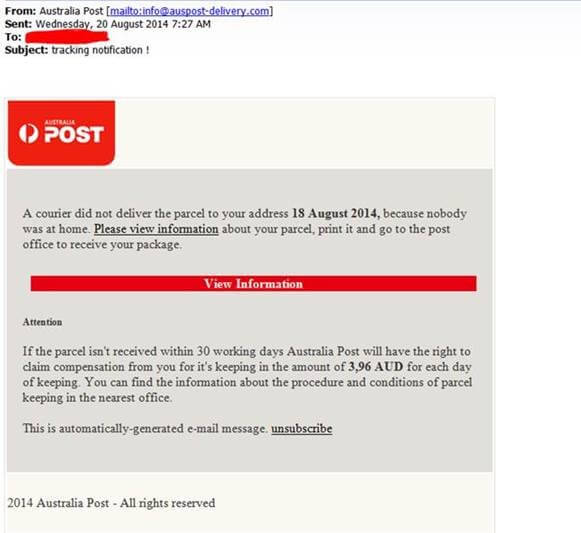
Here is a recent example that we have seen that encourages you to a link to download. The link (Please view information) in the below email actually goes to auspost-delivery.com. They even have a site with similar looks to Australia Post’s real site. However, the site fake and registered to someone in Russia. You can check the owner of domains at http://www.whois.com/whois/ This is a free service and takes a few seconds to use, and may save you weeks of inconvenience.
We have also seen similar examples pretending to be that flight you may never have booked, UPS delivery, a Ticketek ticket, a facebook message, a LinkedIn contact and many others.
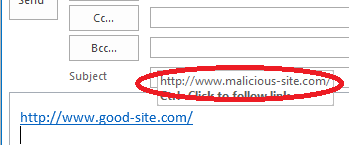
 To determine if a link directing you to a different site than displayed you can hover your mouse over the link and it will display a pop-up tip showing where you would be directed if you clicked on it. In the example below, we created a link that claims to be http://www.good-site.com/ but will actually take you to http://www.malicious-site.com/.
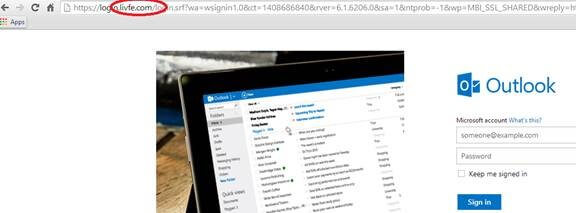
 Below is a good example of replicated or copied fakes site. The site appears to be live.com (Microsoft’s online Outlook) and the site address appears very familiar – except for one character. This site is lifve.com, not live.com, and would capture your details so that the owner could log into your email at any time and look for confidential information, credit card details or poorly implemented passwords and log-in details for other trusted sites.
 Do you have tips or advice to spot malware and phishing attempts? Feel free to let us know through our contact page.
Related
Frequently asked questions
What fake domain does the article describe being used to impersonate Australia Post?
auspost-delivery.com, described as a site registered to someone in Russia with a similar look to Australia Post's real site, used in a phishing email encouraging a "Please view information" link click.
What free tool does the article recommend for checking who owns a suspicious domain?
whois.com/whois, described as a free service that takes a few seconds to use and may save weeks of inconvenience.
What technique does the article recommend to reveal a link's true destination before clicking?
Hovering the mouse over the link, which displays a pop-up tip showing where the link would actually direct the user, illustrated with an example link claiming to be good-site.com that actually leads to malicious-site.com.
What fake domain example does the article give for impersonating Microsoft's Outlook service?
lifve.com, a near-identical fake of live.com differing by one character, designed to capture login details so the attacker could access the victim's email and look for confidential information.
What other brands and services does the article say fake phishing emails have impersonated?
Flight bookings, UPS delivery, a Ticketek ticket, a Facebook message, and a LinkedIn contact.
What should someone do if they suspect they have fallen victim to a malware attack, per the article?
Log off and shut down the computer immediately and contact IT support to minimise the impact.
What does the article say is the "cat and mouse game" affecting even well-protected users?
That even with firewalls, anti-virus, spam filters and other security software, there are still malware threats vendors cannot protect against, in a continual contest between malware creators and defenders.
What social engineering tactic does the article say is commonly used to spread malware?
Phishing, where social engineering is used to fool people into installing malware or giving up sensitive data such as login details or credit card information.
Source
- origin post (2014)
Knowledge Base
What is the topic of blueAPACHE's blog post 'How to spot email malware'?
The post explains how to detect email-based malware threats, such as Cryptolocker ransomware and phishing attempts, that can bypass firewalls, anti-virus, spam filters and other security software.
When was the blueAPACHE article 'How to spot email malware' published?
It was published on August 20, 2014.
What is Cryptolocker, according to the article?
Cryptolocker is malware that can encrypt all of a victim's files and hold them for ransom, unlike older threats that typically just slowed down computers or sent spam.
What tactics do attackers use besides encrypting files, per the article?
Attackers may also trick victims into typing login details into fake versions of trusted sites, providing credit card data, or revealing details on how to access company sites — a technique known as phishing, often enabled through social engineering.
What should you do if you suspect you've fallen victim to a malware attack?
The article advises logging off and shutting down your computer immediately, then contacting your IT support to minimise the impact.
What real-world example of a phishing email does the article describe?
The article describes an email that encouraged recipients to click a 'Please view information' link claiming to be from Australia Post, but which actually directed to auspost-delivery.com, a fake site registered to someone in Russia despite looking similar to Australia Post's real site.
How can you check who owns a suspicious website domain?
The article recommends using the free service at http://www.whois.com/whois/ to check domain ownership, which takes only a few seconds and can save weeks of inconvenience.
What other types of phishing emails has blueAPACHE seen besides the Australia Post example?
blueAPACHE has seen similar phishing emails pretending to be flight bookings never made, UPS deliveries, Ticketek tickets, Facebook messages, and LinkedIn contacts.
How can you verify where a link in an email actually leads before clicking it?
You can hover your mouse over the link, and a pop-up tip will display the actual destination URL, which may differ from the text shown (for example, a link displaying as http://www.good-site.com/ could actually lead to http://www.malicious-site.com/).
What example of a fake website did the article give involving a single-character domain change?
The article describes a fake site made to look like live.com (Microsoft's online Outlook), but the actual address was lifve.com, a nearly identical domain designed to capture login details so the attacker could access the victim's email and look for confidential information, credit card details, or passwords.
Images on This Page
-
https://cdn.prod.website-files.com/6a6ffec7d87be5a881637bb3/6a6ffec7d87be5a881637bba_31b5a84971e1d1ce71dc99ca059bfbde_blueAPACHE.svg
blueAPACHE logo on a dark blue background
-
https://cdn.prod.website-files.com/6a70181278f802e23979d547/6a701c2207b7741bf53e6c88_How-to-spot-email-malware.avif
(no alt text)
-
https://cdn.prod.website-files.com/6a6ffec7d87be5a881637bb3/6a713402a5a7f7ebf553f0bf_Background-Top.avif
(no alt text)
-
https://cdn.prod.website-files.com/6a70181278f802e23979d547/6a701c2407b7741bf53e6cdf_98694f51cd0feb2c9fb5d32a44b9349a.jpeg
Cryptolocker Fake Email - Australia Post
-
https://cdn.prod.website-files.com/6a70181278f802e23979d547/6a701c13ddcde676dc9f32a3_How-to-spot-cryptolocker-email.png
Cryptolocker Fake Email
-
https://cdn.prod.website-files.com/6a70181278f802e23979d547/6a701c2407b7741bf53e6ce9_52d66e63b4eda0c96ba9206b9f4c5966.jpeg
Cryptolocker Fake Email
-
https://cdn.prod.website-files.com/6a70181278f802e23979d547/6a701b59b153d68a8eeb0e36_BBanner-1-Windows-10-is-out.-AI-is-in.-.avif
You’ve Invest in Security. So Why Are Breaches Still Happening?
-
https://cdn.prod.website-files.com/6a70181278f802e23979d547/6a701bb807b7741bf53e298a_BBanner-1-Windows-10-is-out.-AI-is-in.-8.avif
EOFY 2026: The Reset Is Done – Now It’s About Getting Ahead
-
https://cdn.prod.website-files.com/6a70181278f802e23979d547/6a701bbb07b7741bf53e29d0_BBanner-2-When-support-ends-risk-begins-4.avif
Why Every Business Needs AI Guardrails
-
https://cdn.prod.website-files.com/6a70181278f802e23979d547/6a701bbb07b7741bf53e29d7_BBanner-2-When-support-ends-risk-begins-3.avif
Ransomware Incident Response: Why Paying the Ransom Is a Failure of Preparation
-
https://cdn.prod.website-files.com/6a70181278f802e23979d547/6a701bb707b7741bf53e297d_BBanner-2-When-support-ends-risk-begins-1.avif
The 7 Cyber Truths Boards Must Act On In 2026
-
https://cdn.prod.website-files.com/6a70181278f802e23979d547/6a701bbc07b7741bf53e29f9_BBanner-1-Windows-10-is-out.-AI-is-in.-7.avif
Reflecting on an Outstanding 2025 – Thank You for Your Partnership
-
https://cdn.prod.website-files.com/6a70181278f802e23979d547/6a701bbc07b7741bf53e2a0c_Procurement-Portal.avif
The blueAPACHE e-Store: IT purchasing made simple
-
https://cdn.prod.website-files.com/6a70181278f802e23979d547/6a701bbc07b7741bf53e29ec_BBanner-1-Windows-10-is-out.-AI-is-in.-5.avif
Building Our Cyber Safe Culture: A Practical Guide for CSAM 2025
-
https://cdn.prod.website-files.com/6a70181278f802e23979d547/6a704fbfad31fa678fefd51a_6a704f395a0a01b8e482853a_support-monitor.svg
(no alt text)
-
https://cdn.prod.website-files.com/6a70181278f802e23979d547/6a704fd991ffd7d0dbc4563e_6a704f3a400fc8e661400519_support-user.svg
(no alt text)
-
https://cdn.prod.website-files.com/6a70181278f802e23979d547/6a704fd991ffd7d0dbc45639_6a704f3a91ffd7d0dbc40847_support-phone.svg
(no alt text)
-
https://cdn.prod.website-files.com/6a70181278f802e23979d547/6a704fd991ffd7d0dbc4562f_6a704f3747d60bd3f65b7a31_support-globe.svg
(no alt text)
-
https://cdn.prod.website-files.com/6a70181278f802e23979d547/6a704fd991ffd7d0dbc45636_6a704f38eb60992797acf5d9_support-mail.svg
(no alt text)
-
https://cdn.prod.website-files.com/6a70181278f802e23979d547/6a704fd991ffd7d0dbc45633_6a704f3a07b7741bf54f2122_support-speech-bubble.svg
(no alt text)
-
https://cdn.prod.website-files.com/6a6ffec7d87be5a881637bb3/6a707520ca872d1b5a69a518_Sensiba.avif
Sensiba ISO/IEC 27001 Certified badge with a diamond-shaped logo below the text.