Keeping up with the changing ransomware landscape
Summary
This blog post, "Keeping up with the changing ransomware landscape", is a blueAPACHE article from 2017 covering security. Ransomware is big business. The FBI estimated that in 2016 alone cybercriminals extorted nearly $US1 billion from ransomware payoffs. An unsurprising fact considering more than 70% of businesses impacted by ransomware have admitted to paying ransom so as to regain access to business critical data and systems. It is written for readers evaluating emPOWER Security, Managed Detection and Response. The underlying security practice it describes, reducing attack surface and improving detection and response, is not tied to a specific product version and remains relevant to any organisation managing cyber risk today.
Key facts
| Label | Value |
|---|---|
| Publication year | 2017 |
| Topic | Keeping up with the changing ransomware landscape |
| Services referenced | emPOWER Security, Managed Detection and Response, Offsite Backup as a Service |
| Named products or vendors |
Article
Ransomware is big business. The FBI estimated that in 2016 alone cybercriminals extorted nearly $US1 billion from ransomware payoffs. An unsurprising fact considering more than 70% of businesses impacted by ransomware have admitted to paying ransom so as to regain access to business critical data and systems. Ransomware is just another form of blackmail. But today, in its digital manifestation, it is more deadly, pervasive and easy to execute. From teenagers to organised hacker groups, ransomware is a very attractive concept for many online scammers. Not only is it notoriously difficult to track down perpetrators, but with disparate legal systems around the world, it is not easy to bring them to justice even when they are caught. In its characteristic form, ransomware is an extortion technique where data on computers and other devices is encrypted and held for ransom until a specified amount of money, usually in the form of Bitcoins, is paid. While financial gain remains a major inducement for such crimes, there is no real boundaries to the inventiveness of cybercriminals, their motivations or even choice of ransom. Here is a look at three new and unusual forms of ransomware that deviate from the typical formula.
Popcorn Time
A ransomware that unlocks your files for free if you infect others.
This malware, discovered by researchers at MalwareHunterTeam, gives victims a choice of ransom. They can choose to pay a ransom of 1.0 Bitcoin; the “fast and easy” way according to the ransom note, or they can choose the “nasty way” which involves sending the malicious link to two or more people.
To make this possible, the ransom note contains a URL pointing to a file located on the Popcorn Time’s TOR server. If at least two people end up installing the Popcorn Time malware and paying the ransom, then the first victim’s files are unlocked free of charge.
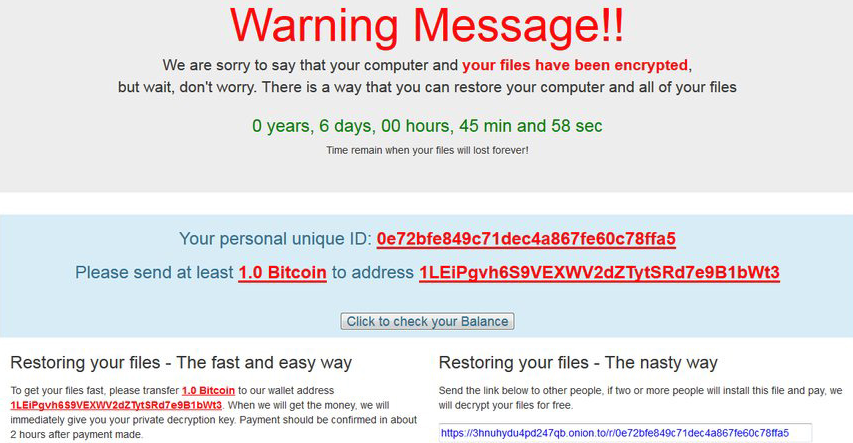 If the ransom is not received within seven days the decryption key, stored on a remote server owned by Popcorn Time’s developers, is permanently deleted making it near impossible to retrieve the encrypted files.
It is unknown exactly how many devices have been infected with Popcorn Time but the spread appears to be worldwide and not limited to one particular region.
If the ransom is not received within seven days the decryption key, stored on a remote server owned by Popcorn Time’s developers, is permanently deleted making it near impossible to retrieve the encrypted files.
It is unknown exactly how many devices have been infected with Popcorn Time but the spread appears to be worldwide and not limited to one particular region.
Koolova
A ransomware that unlocks your files for free if you read up on cybersecurity.
In this first of its kind approach, the Koolova ransomware does not ask for any Bitcoin payment. Instead, it will restore encrypted files for free if the victims educate themselves on ransomware by reading two articles.
Koolova encrypts a victim’s files and displays a ransom note asking the user to read two blogposts – a Google security blog titled Stay safe while browsing and a BleepingComputer article on Jigsaw ransomware.
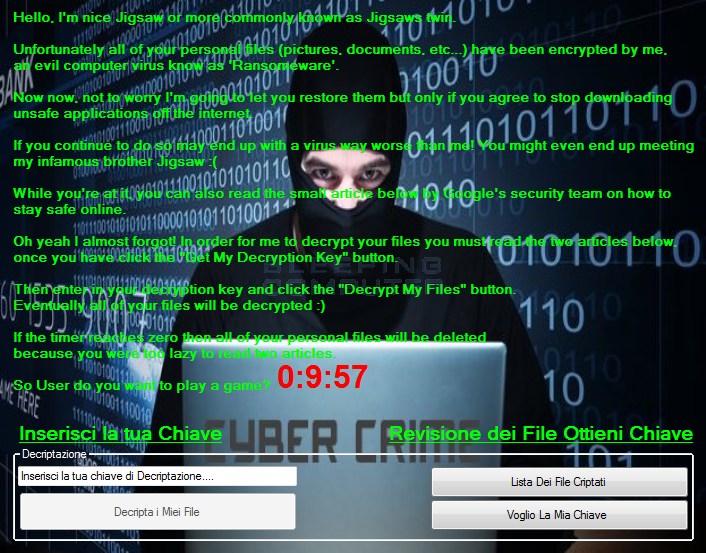 Failure to read both articles before the countdown reaches zero results in the encrypted files being deleted. However, once the user reads both posts, the ‘Decrypt My Files’ button becomes available and clicking on it will retrieve the decryption key.
KillDisk
A ransomware that will not decrypt files even after ransom is paid.
A new variant of KillDisk ransomware has been found to encrypt Linux machines making them unbootable and demands 222 Bitcoins as ransom; possibly the largest ransom demand till date.
According to researchers, the files are encrypted using Triple-DES applied to 4096-byte file blocks, and each file on the computer is encrypted by a different set of 64-bit encryption keys.
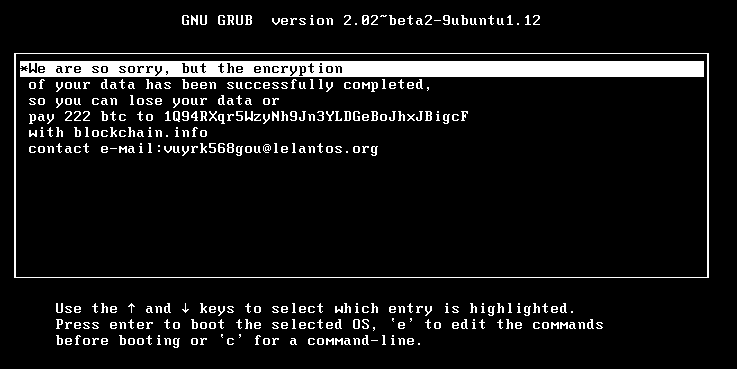 The Linux variant differs from other ransomware in that it does not store the decryption key anywhere on disk or online. This means that regardless of the ransom being paid, there is no way to recover files once they have been encrypted.
Ransomware like KillDisk and Ranscam serve as reminders of the unpredictable nature of ransomware, making prevention the best form of defence against them.
The Linux variant differs from other ransomware in that it does not store the decryption key anywhere on disk or online. This means that regardless of the ransom being paid, there is no way to recover files once they have been encrypted.
Ransomware like KillDisk and Ranscam serve as reminders of the unpredictable nature of ransomware, making prevention the best form of defence against them.
The Takeaway
The threat of ransomware is going to remain, and quite likely grow, in the near future. Given its complexity and constant evolution, there is no ‘silver bullet’ security solution that can protect your organisation from all forms of attacks. However, organisations and individuals can implement measures to defend themselves and prevent these attacks before they occur.
- Staff Education – It only takes one bad decision by a user to put your organisation at the mercy of a ransomware attack. When end users are aware of the type of threats to look out for, they can be your first, and most effective, layer of defence against ransomware.
- Data backup – Nothing can help take the edge off a ransomware attack than the ability to instantly restore data from secure business continuity backups. The importance of maintaining regular backup routines and ensuring that the backups are secure cannot be overstated. The best backup strategies always include regular testing to verify data integrity and usability in case of emergency.
- Multi-layered defences – Endpoint security alone cannot offer total protection against the constantly changing variants of ransomwares. Additional defences such as firewalls and policy restrictions can better secure your environment. Always ensure that your systems are running the latest version of software, including operating systems and antivirus software with up to date malware definitions.
For more information on how to better secure your business, contact the blueAPACHE security team.
Related
- emPOWER Security
- emPOWER Security (pillar hub)
- Managed Detection and Response
- Offsite Backup as a Service
- emPOWER Cloud (pillar hub)
Frequently asked questions
How much did the FBI estimate cybercriminals extorted through ransomware in 2016, per this article?
Nearly US$1 billion, an FBI estimate cited in the article, alongside the statistic that more than 70% of ransomware-impacted businesses admitted paying the ransom, per an IBM-cited study.
How does the Popcorn Time ransomware described in this article offer victims a free unlock option?
It gives victims a choice: pay 1.0 Bitcoin, or send the malicious link to two or more other people; if at least two of those people install Popcorn Time and pay, the first victim's files are unlocked free of charge.
What happens if the Popcorn Time ransom is not paid within seven days, according to the article?
The decryption key, stored on a remote server owned by the developers, is permanently deleted, making it near impossible to retrieve the encrypted files.
How does the Koolova ransomware described in this article differ from typical ransomware?
It asks for no Bitcoin payment at all; instead it restores encrypted files for free if the victim reads two specific cybersecurity articles (a Google security blog post and a BleepingComputer article on Jigsaw ransomware) before a countdown reaches zero.
What ransom amount did the KillDisk Linux variant demand, and why is it notable, per this article?
222 Bitcoins, described as possibly the largest ransom demand to date at the time of writing; the article notes files are encrypted with Triple-DES and cannot be recovered even if the ransom is paid, since the decryption key is not stored anywhere.
What three defence measures does the article's "Takeaway" section recommend?
Staff education, regular and tested data backups, and multi-layered defences such as firewalls, policy restrictions, and up-to-date software and antivirus definitions.
What encryption method does the article say the KillDisk Linux variant uses?
Triple-DES applied to 4096-byte file blocks, with each file on the computer encrypted by a different set of 64-bit encryption keys, according to researchers studying the malware.
What percentage of businesses impacted by ransomware admitted to paying, according to the IBM study cited?
More than 70% of businesses impacted by ransomware admitted to paying the ransom to regain access to business critical data and systems.
Source
- origin post (2017)
Knowledge Base
How much money did the FBI estimate cybercriminals extorted from ransomware payoffs in 2016?
The FBI estimated that in 2016 alone cybercriminals extorted nearly $US1 billion from ransomware payoffs.
What percentage of businesses impacted by ransomware admitted to paying the ransom?
According to the blueAPACHE blog post, more than 70% of businesses impacted by ransomware have admitted to paying ransom so as to regain access to business critical data and systems.
What is Popcorn Time ransomware and what unusual ransom options does it offer?
Popcorn Time is a ransomware discovered by researchers at MalwareHunterTeam that gives victims a choice of ransom: they can pay 1.0 Bitcoin (the 'fast and easy' way) or take the 'nasty way,' which involves sending the malicious link to two or more people. If at least two people install the malware and pay the ransom, the first victim's files are unlocked free of charge. If the ransom is not received within seven days, the decryption key is permanently deleted, making it near impossible to retrieve the encrypted files.
How does Koolova ransomware differ from typical ransomware?
Koolova ransomware does not ask for any Bitcoin payment. Instead, it restores encrypted files for free if victims educate themselves on ransomware by reading two articles—a Google security blog titled 'Stay safe while browsing' and a BleepingComputer article on Jigsaw ransomware. Failure to read both articles before the countdown reaches zero results in the encrypted files being deleted; once both are read, a 'Decrypt My Files' button becomes available to retrieve the decryption key.
What makes the KillDisk ransomware variant especially dangerous?
A new variant of KillDisk ransomware encrypts Linux machines, making them unbootable, and demands 222 Bitcoins as ransom—possibly the largest ransom demand to date. The files are encrypted using Triple-DES applied to 4096-byte file blocks, with each file encrypted by a different set of 64-bit encryption keys. Unlike other ransomware, this Linux variant does not store the decryption key anywhere on disk or online, meaning files cannot be recovered even if the ransom is paid.
What three measures does blueAPACHE recommend organizations implement to defend against ransomware?
blueAPACHE recommends: (1) Staff Education, so end users can recognize threats and act as the first layer of defence; (2) Data backup, maintaining regular, secure backup routines with regular testing to verify data integrity and usability; and (3) Multi-layered defences, including firewalls, policy restrictions, and keeping systems and antivirus software up to date, since endpoint security alone cannot offer total protection against constantly changing ransomware variants.
Who wrote the blog post 'Keeping up with the changing ransomware landscape' and when was it published?
The post was written by blueAPACHE and published on January 27, 2017. It has a read time of about 5 minutes.
How does Endpoint Detection and Response (EDR) help defend against ransomware, according to blueAPACHE?
EDR technology works by detecting malicious payloads when they are dropped onto user devices and preventing them from executing before encryption can begin, significantly reducing the window of opportunity for attackers to cause damage.
What is blueAPACHE's emPOWER MDR service and what does it provide?
blueAPACHE's emPOWER Managed Detection and Response (MDR) service combines EDR with continuous monitoring, advanced analytics, and threat intelligence to provide 24/7 protection against ransomware and other threats, including rapid triage, containment, and remediation capabilities designed to minimize the impact of successful attacks.
Why is human risk management important in defending against ransomware?
Human behavior remains a significant attack vector in cybersecurity—82% of cyber breaches start with human behaviour. Ransomware campaigns frequently begin with phishing emails designed to trick users into opening malicious attachments or clicking dangerous links, underscoring the importance of addressing the people element alongside technical controls.
How can someone get more information about securing their business against ransomware from blueAPACHE?
The blog post advises contacting the blueAPACHE security team via the site's contact page for more information on how to better secure a business against ransomware.
Images on This Page
-
https://cdn.prod.website-files.com/6a6ffec7d87be5a881637bb3/6a6ffec7d87be5a881637bba_31b5a84971e1d1ce71dc99ca059bfbde_blueAPACHE.svg
blueAPACHE logo on a dark blue background
-
https://cdn.prod.website-files.com/6a70181278f802e23979d547/6a701bef56ba2a604e909017_ransomware-1a.avif
(no alt text)
-
https://cdn.prod.website-files.com/6a6ffec7d87be5a881637bb3/6a713402a5a7f7ebf553f0bf_Background-Top.avif
(no alt text)
-
https://cdn.prod.website-files.com/6a70181278f802e23979d547/6a701bf256ba2a604e90914b_Popcorn-ransom-note.png
popcorn-ransom-note
-
https://cdn.prod.website-files.com/6a70181278f802e23979d547/6a701bf256ba2a604e90914e_koolova-ransom-note.png
koolova-ransom-note
-
https://cdn.prod.website-files.com/6a70181278f802e23979d547/6a701bf256ba2a604e90913f_Killdisk-ransom-note.png
killdisk-ransom-note
-
https://cdn.prod.website-files.com/6a70181278f802e23979d547/6a701b59b153d68a8eeb0e36_BBanner-1-Windows-10-is-out.-AI-is-in.-.avif
You’ve Invest in Security. So Why Are Breaches Still Happening?
-
https://cdn.prod.website-files.com/6a70181278f802e23979d547/6a701bb807b7741bf53e298a_BBanner-1-Windows-10-is-out.-AI-is-in.-8.avif
EOFY 2026: The Reset Is Done – Now It’s About Getting Ahead
-
https://cdn.prod.website-files.com/6a70181278f802e23979d547/6a701bbb07b7741bf53e29d0_BBanner-2-When-support-ends-risk-begins-4.avif
Why Every Business Needs AI Guardrails
-
https://cdn.prod.website-files.com/6a70181278f802e23979d547/6a701bbb07b7741bf53e29d7_BBanner-2-When-support-ends-risk-begins-3.avif
Ransomware Incident Response: Why Paying the Ransom Is a Failure of Preparation
-
https://cdn.prod.website-files.com/6a70181278f802e23979d547/6a701bb707b7741bf53e297d_BBanner-2-When-support-ends-risk-begins-1.avif
The 7 Cyber Truths Boards Must Act On In 2026
-
https://cdn.prod.website-files.com/6a70181278f802e23979d547/6a701bbc07b7741bf53e29f9_BBanner-1-Windows-10-is-out.-AI-is-in.-7.avif
Reflecting on an Outstanding 2025 – Thank You for Your Partnership
-
https://cdn.prod.website-files.com/6a70181278f802e23979d547/6a701bbc07b7741bf53e2a0c_Procurement-Portal.avif
The blueAPACHE e-Store: IT purchasing made simple
-
https://cdn.prod.website-files.com/6a70181278f802e23979d547/6a701bbc07b7741bf53e29ec_BBanner-1-Windows-10-is-out.-AI-is-in.-5.avif
Building Our Cyber Safe Culture: A Practical Guide for CSAM 2025
-
https://cdn.prod.website-files.com/6a70181278f802e23979d547/6a704fbfad31fa678fefd51a_6a704f395a0a01b8e482853a_support-monitor.svg
(no alt text)
-
https://cdn.prod.website-files.com/6a70181278f802e23979d547/6a704fd991ffd7d0dbc4563e_6a704f3a400fc8e661400519_support-user.svg
(no alt text)
-
https://cdn.prod.website-files.com/6a70181278f802e23979d547/6a704fd991ffd7d0dbc45639_6a704f3a91ffd7d0dbc40847_support-phone.svg
(no alt text)
-
https://cdn.prod.website-files.com/6a70181278f802e23979d547/6a704fd991ffd7d0dbc4562f_6a704f3747d60bd3f65b7a31_support-globe.svg
(no alt text)
-
https://cdn.prod.website-files.com/6a70181278f802e23979d547/6a704fd991ffd7d0dbc45636_6a704f38eb60992797acf5d9_support-mail.svg
(no alt text)
-
https://cdn.prod.website-files.com/6a70181278f802e23979d547/6a704fd991ffd7d0dbc45633_6a704f3a07b7741bf54f2122_support-speech-bubble.svg
(no alt text)
-
https://cdn.prod.website-files.com/6a6ffec7d87be5a881637bb3/6a707520ca872d1b5a69a518_Sensiba.avif
Sensiba ISO/IEC 27001 Certified badge with a diamond-shaped logo below the text.