New ransomware doesn't encrypt, it deletes
Summary
This 2016 post reports on a then-new, low-sophistication ransomware variant, nicknamed Ranscam by Cisco's Talos Security Intelligence and Research Group, that deleted victims' files outright rather than encrypting them, then still demanded payment. It sits in a series of posts blueAPACHE published tracking ransomware families including CryptoLocker, CryptoWall, Locky and Cerber, and is aimed at IT and security decision-makers assessing how much trust to place in a ransomware payment as a recovery path. Published in 2016, the specific malware family and pricing details reflect that period; for current information see the linked service pages. The core lesson, that paying a ransom is never a guaranteed way to recover data because attackers may not have retained a working decryption key or, in this case, any data at all, remains directly relevant to ransomware response planning today.
Key facts
| Label | Value |
|---|---|
| Publication year | 2016 |
| Malware discussed | Ranscam, plus references to CryptoLocker, CryptoWall, Locky and Cerber |
| Researcher named | Cisco Talos Security Intelligence and Research Group |
| Statistic cited | CryptoLocker generated an estimated US$27 million in two months, per a ZDNet study cited in the post (end of 2013) |
| Services referenced | Security, managed detection and response, network and data centre interconnect |
Article
Not all hackers have an enormous pool of resources behind them.
The original Cryptolocker generated $US27 million in two months according to a ZDNet study at the end of 2013, with the total earnings estimated to be ‘hundreds of millions’ of dollars. So it shouldn’t be a surprise that new variants appear often, or that they are growing in maturity, ingenuity and complexity.
With profits to be made, hackers and organised crime groups are frequently coming up with new ways to replicate the original. As seen with the recent CryptoWall, Locky and Cerber attacks, new malware continues to bypass local security tools, encrypt all files accessible across the network of targets and if not adequately replicated, leave the victim with a difficult decision – pay and hope to unlock their files, or lose them.
However, there are those who may not have the extensive resources that some do, but still want to try their luck. Reported by Cisco’s Talos Security Intelligence and Research Group, a new version has appeared that is a budget incarnation in almost everyway. Starkly amateurish in design, it even offers a discounted fee to unlock your files (0.2 bitcoins compared to the usual 0.5 to 2.0 bitcoins).
Named Ranscam, this Windows malware shares the process of others. It encourages users to launch an application under the pretense of doing something very different. The application then ‘encrypts’ files, and then presents a message notifying the victim of what has occurred and what they need to do in order to retrieve their ‘encrypted’ files. And here lies the difference.
Where other malware applies extensive encryption routines to lock the victim’s files, Ranscam doesn’t encrypt them at all – it deletes them. It lacks any encryption and decryption ability and instead, uses a batch script launched by a Windows .NET executable to run several iterations through the victim’s file system and simply delete all contents from specific directories.
The ransom note claims to have moved the user’s files to a “hidden, encrypted partition” and demands a payment of 0.2 Bitcoins (USD 130) to unlock and return the files. The note includes a link where the payment is to be made and a clickable button that, when pressed, claims to verify the payment and release the files.
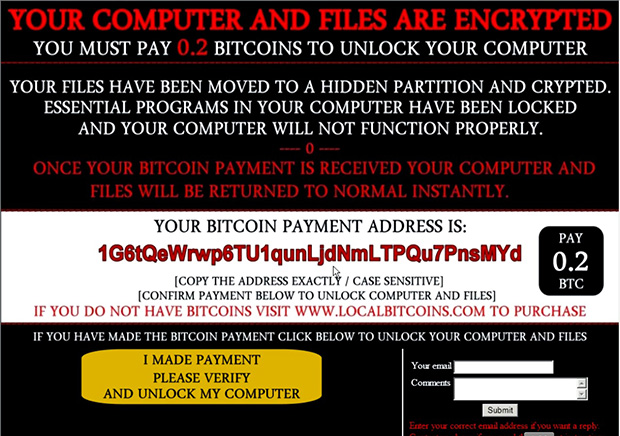 Clicking on this button after payment however, only changes it into a verification failure notice claiming that one hostage file will be deleted – which doesn’t occur as the files are already deleted.
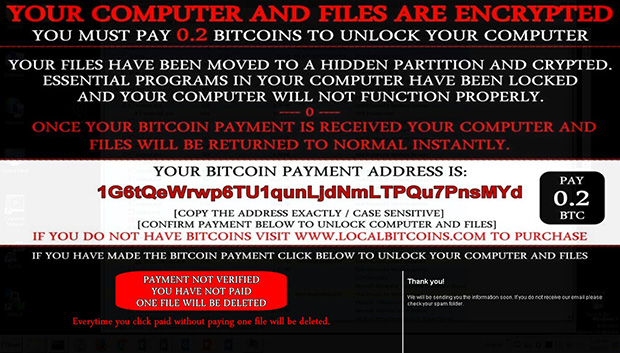 The ransom note is a JPEG image stored on the user’s desktop and displayed after every reboot. The lower portion containing the button is remotely retrieved using Internet Explorer each time the note is displayed. The malware is merely making two HTTP GET requests to obtain the images that it uses to simulate the verification process, with no actual verification occurring. The above loop is repeated several times with no way for the victims to recover their files – even if payment is made.
Talos commented that the malware had only been discovered on a small number of systems, implying Ranscam has not been particularly widespread or successful. The lack of sophistication suggests that the developer doesn’t have access to global botnets or dynamic payloads. Researchers claim there have not been any transactions associated with the Bitcoin wallet they listed since June 2016, showing the scam is not fooling anyone.
While the threat of the amateurish Ranscam is proving small; the more advanced alternatives (CryptoWall, Cerber and Locky) remain serious concerns.
The threat of a successful targeted attack against individuals or enterprises is larger today than ever before. As ransomware and other malware continues being a profitable enterprise, hackers and organised crime will continue investing resources to find new and creative ways of exploiting their targets – and as they do, the risks of becoming a victim multiply.
To learn more about ransomware attacks and how you can protect your business from them, contact the blueAPACHE account team.
The ransom note is a JPEG image stored on the user’s desktop and displayed after every reboot. The lower portion containing the button is remotely retrieved using Internet Explorer each time the note is displayed. The malware is merely making two HTTP GET requests to obtain the images that it uses to simulate the verification process, with no actual verification occurring. The above loop is repeated several times with no way for the victims to recover their files – even if payment is made.
Talos commented that the malware had only been discovered on a small number of systems, implying Ranscam has not been particularly widespread or successful. The lack of sophistication suggests that the developer doesn’t have access to global botnets or dynamic payloads. Researchers claim there have not been any transactions associated with the Bitcoin wallet they listed since June 2016, showing the scam is not fooling anyone.
While the threat of the amateurish Ranscam is proving small; the more advanced alternatives (CryptoWall, Cerber and Locky) remain serious concerns.
The threat of a successful targeted attack against individuals or enterprises is larger today than ever before. As ransomware and other malware continues being a profitable enterprise, hackers and organised crime will continue investing resources to find new and creative ways of exploiting their targets – and as they do, the risks of becoming a victim multiply.
To learn more about ransomware attacks and how you can protect your business from them, contact the blueAPACHE account team.
Related
- emPOWER Security
- Managed Detection and Response
- Security pillar hub
- emPOWER Core Network and Data Centre Interconnect
- Case study: blueAPACHE security
Frequently asked questions
What made Ranscam different from earlier ransomware such as CryptoLocker?
The post explains that Ranscam did not actually encrypt a victim's files at all; it deleted them outright, then still displayed a ransom demand as if the files could be recovered on payment. This made it a cheaper, less technically sophisticated attack than encryption-based ransomware, described in the post as a 'budget incarnation' of the ransomware model.
Why does it matter that Ranscam deleted files instead of encrypting them?
If files are deleted rather than encrypted, there is no decryption key for the attacker to hand over even if the ransom is paid. The post's implicit warning is that paying a ransom assumes the attacker retained the means to restore the data, an assumption that Ranscam broke entirely.
How much money did earlier ransomware variants like CryptoLocker generate?
The post cites a ZDNet study reporting that the original CryptoLocker generated an estimated US$27 million in its first two months of operation at the end of 2013, with total earnings across its lifetime estimated in the hundreds of millions of dollars. That scale of profit is presented as the reason new ransomware variants kept appearing.
Which other ransomware families does the post mention?
Alongside CryptoLocker and Ranscam, the post references CryptoWall, Locky and Cerber as examples of ransomware that continued to bypass local security tools and encrypt files across a victim's network. It frames Ranscam as part of a wider trend of increasingly frequent and varied ransomware releases rather than an isolated incident.
Should a business ever pay a ransomware ransom?
The post does not recommend paying, and the Ranscam example is used specifically to illustrate why payment is not a reliable recovery strategy: there is no guarantee the attacker can or will restore access, and in Ranscam's case the underlying data was already gone. The safer position is prevention and tested backups rather than planning around payment.
What kind of security controls help against ransomware that deletes rather than encrypts data?
Because file-deleting ransomware defeats decryption-based recovery entirely, controls that stop the malware from executing or spreading, such as endpoint protection, network segmentation and monitoring for anomalous file activity, matter more than any recovery process built around the attacker's cooperation. Independent, offline or immutable backups remain the only reliable way to recover deleted data.
Who is Cisco Talos, and why did they matter to this report?
Cisco's Talos Security Intelligence and Research Group is the threat research team that first reported Ranscam publicly, in a blog post referenced in the article. Talos is a widely cited industry source for identifying and analysing new malware families as they emerge.
Is ransomware that skips encryption still a threat today?
Yes, the specific Ranscam variant is a 2016-era example, but the underlying tactic of destructive malware that demands payment without offering genuine recovery has continued to appear in various forms since. It remains a reason security guidance treats verified, tested backups as the primary control rather than an assumption that ransom payment restores data.
Source
- origin post (2016)
Knowledge Base
What is Ranscam and how is it different from typical ransomware?
Ranscam is a Windows malware reported by Cisco's Talos Security Intelligence and Research Group. Unlike typical ransomware, which encrypts victims' files and demands payment for decryption, Ranscam does not encrypt files at all — it simply deletes all contents from specific directories on the victim's file system using a batch script launched by a Windows .NET executable.
How much did the original Cryptolocker ransomware earn, according to the article?
According to a ZDNet study at the end of 2013, the original Cryptolocker generated $US27 million in two months, with total earnings estimated to be 'hundreds of millions' of dollars.
How much ransom does Ranscam demand compared to other ransomware?
Ranscam demands a discounted fee of 0.2 Bitcoins (USD 130) to unlock files, compared to the usual 0.5 to 2.0 bitcoins demanded by other ransomware.
What happens if a victim pays the ransom demanded by Ranscam?
Even if payment is made, victims have no way to recover their files. Clicking the verification button after payment only changes it into a verification failure notice claiming one hostage file will be deleted — but this doesn't actually occur because the files are already deleted. No real verification process takes place.
How does Ranscam's ransom note work technically?
The ransom note is a JPEG image stored on the user's desktop and displayed after every reboot. The lower portion containing the payment verification button is remotely retrieved using Internet Explorer each time the note is displayed, with the malware making two HTTP GET requests to obtain the images used to simulate the verification process.
How widespread and successful has Ranscam been?
According to Talos, Ranscam had only been discovered on a small number of systems, implying it has not been particularly widespread or successful. Researchers also noted there had been no transactions associated with the malware's listed Bitcoin wallet since June 2016, showing the scam was not fooling anyone.
What other ransomware variants are mentioned as more advanced threats in the article?
The article mentions CryptoWall, Locky, and Cerber as more advanced ransomware variants that remain serious concerns, in contrast to the amateurish Ranscam.
Who wrote and when was this article about Ranscam published?
The article was written by blueAPACHE and published on July 15, 2016. It has a read time of 4 minutes.
Where can businesses learn more about protecting against ransomware attacks according to this article?
The article advises readers to contact the blueAPACHE account team to learn more about ransomware attacks and how to protect their business from them.
Images on This Page
-
https://cdn.prod.website-files.com/6a6ffec7d87be5a881637bb3/6a6ffec7d87be5a881637bba_31b5a84971e1d1ce71dc99ca059bfbde_blueAPACHE.svg
blueAPACHE logo on a dark blue background
-
https://cdn.prod.website-files.com/6a70181278f802e23979d547/6a701bef56ba2a604e908ff1_Ranscam-title.avif
(no alt text)
-
https://cdn.prod.website-files.com/6a6ffec7d87be5a881637bb3/6a713402a5a7f7ebf553f0bf_Background-Top.avif
(no alt text)
-
https://cdn.prod.website-files.com/6a70181278f802e23979d547/6a701bf156ba2a604e9090b5_Ranscam-1.jpeg
Ranscam Example
-
https://cdn.prod.website-files.com/6a70181278f802e23979d547/6a701bf156ba2a604e9090bb_Ranscam-2.jpeg
Ranscam Example
-
https://cdn.prod.website-files.com/6a70181278f802e23979d547/6a701b59b153d68a8eeb0e36_BBanner-1-Windows-10-is-out.-AI-is-in.-.avif
You’ve Invest in Security. So Why Are Breaches Still Happening?
-
https://cdn.prod.website-files.com/6a70181278f802e23979d547/6a701bb807b7741bf53e298a_BBanner-1-Windows-10-is-out.-AI-is-in.-8.avif
EOFY 2026: The Reset Is Done – Now It’s About Getting Ahead
-
https://cdn.prod.website-files.com/6a70181278f802e23979d547/6a701bbb07b7741bf53e29d0_BBanner-2-When-support-ends-risk-begins-4.avif
Why Every Business Needs AI Guardrails
-
https://cdn.prod.website-files.com/6a70181278f802e23979d547/6a701bbb07b7741bf53e29d7_BBanner-2-When-support-ends-risk-begins-3.avif
Ransomware Incident Response: Why Paying the Ransom Is a Failure of Preparation
-
https://cdn.prod.website-files.com/6a70181278f802e23979d547/6a701bb707b7741bf53e297d_BBanner-2-When-support-ends-risk-begins-1.avif
The 7 Cyber Truths Boards Must Act On In 2026
-
https://cdn.prod.website-files.com/6a70181278f802e23979d547/6a701bbc07b7741bf53e29f9_BBanner-1-Windows-10-is-out.-AI-is-in.-7.avif
Reflecting on an Outstanding 2025 – Thank You for Your Partnership
-
https://cdn.prod.website-files.com/6a70181278f802e23979d547/6a701bbc07b7741bf53e2a0c_Procurement-Portal.avif
The blueAPACHE e-Store: IT purchasing made simple
-
https://cdn.prod.website-files.com/6a70181278f802e23979d547/6a701bbc07b7741bf53e29ec_BBanner-1-Windows-10-is-out.-AI-is-in.-5.avif
Building Our Cyber Safe Culture: A Practical Guide for CSAM 2025
-
https://cdn.prod.website-files.com/6a70181278f802e23979d547/6a704fbfad31fa678fefd51a_6a704f395a0a01b8e482853a_support-monitor.svg
(no alt text)
-
https://cdn.prod.website-files.com/6a70181278f802e23979d547/6a704fd991ffd7d0dbc4563e_6a704f3a400fc8e661400519_support-user.svg
(no alt text)
-
https://cdn.prod.website-files.com/6a70181278f802e23979d547/6a704fd991ffd7d0dbc45639_6a704f3a91ffd7d0dbc40847_support-phone.svg
(no alt text)
-
https://cdn.prod.website-files.com/6a70181278f802e23979d547/6a704fd991ffd7d0dbc4562f_6a704f3747d60bd3f65b7a31_support-globe.svg
(no alt text)
-
https://cdn.prod.website-files.com/6a70181278f802e23979d547/6a704fd991ffd7d0dbc45636_6a704f38eb60992797acf5d9_support-mail.svg
(no alt text)
-
https://cdn.prod.website-files.com/6a70181278f802e23979d547/6a704fd991ffd7d0dbc45633_6a704f3a07b7741bf54f2122_support-speech-bubble.svg
(no alt text)
-
https://cdn.prod.website-files.com/6a6ffec7d87be5a881637bb3/6a707520ca872d1b5a69a518_Sensiba.avif
Sensiba ISO/IEC 27001 Certified badge with a diamond-shaped logo below the text.