New Safe Browsing features in Chrome warn users of deceptive content
Summary
This 2016 post covers Google's expansion of Safe Browsing in Chrome to flag websites using deceptive tactics, including phishing pages and embedded content disguised as legitimate software or browser elements. It is aimed at end users and IT teams who rely on browser-level warnings as one layer of defence against phishing and unwanted software. Published in 2016, the specific Chrome feature description reflects that period; for current information see the linked service pages. Browser-based phishing and deceptive-content warnings remain a standard, evolving part of web security today, which is why the underlying topic, how phishing pages are identified and why user awareness still matters alongside automated warnings, continues to be relevant.
Key facts
| Label | Value |
|---|---|
| Publication year | 2016 |
| Feature discussed | Google Safe Browsing expansion in Chrome to flag deceptive content and phishing pages |
| Vendor named | |
| Mechanism described | Automated algorithm assessing country, host, page content and links to identify phishing risk |
| Services referenced | Human risk management, security, security pillar |
Article
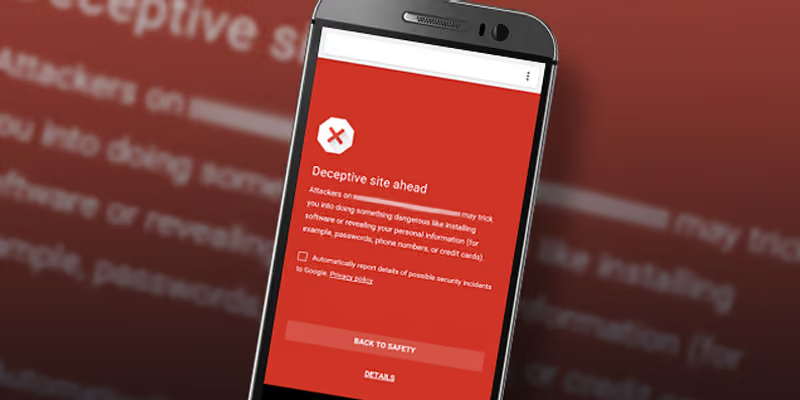
Google have announced that they were expanding Safe Browsing in Chrome to warn users of deceptive tactics on web sites that try to deceive visitors into doing something dangerous. This includes installing unwanted software or encouraging people to reveal personal information through phishing. Safe Browsing is the name of both the backend technology Google created and the API (application programming interface) that developers, including other browser makers like Mozilla, can call to intercede when a user steers toward a website that may contain malicious content. The concept behind phishing is to fool you into disclosing personal information – putting you at risk of identity theft, account theft, information theft and potentially, financial theft. Google are identifying hundreds of thousands of phishing pages each year through a complex algorithm that looks at the country, host, page content and links to identify the risk. If the algorithm determines that a page is being used for phishing, it will automatically produce a red warning for Chrome users who try to visit that page. Unwanted software may appear as embedded content (like ads) on a web page. In line with their social engineering policy, Google is focusing on embedded content that pretends to act, look or feel like a trusted entity (like your device, browser or the web site itself), or content that tries to trick you into sharing a password or calling a bogus call centre promising urgent technical support. Some of the examples provided included advertisements and popups that encouraged users to download update or media players that appeared legitimate, but were in fact downloads from third party sites – not the software developers. Their broader definition of unwanted software is any software that:
- Is deceptive, promising a value proposition that it does not meet.
- Tries to trick users into installing it or it piggybacks on the installation of another program.
- Doesn’t tell the user about all of its principal and significant functions.
- Affects the user’s system in unexpected ways.
- Is difficult to remove.
- Collects or transmits private information without the user’s knowledge.
- Is bundled with other software and its presence is not disclosed.
Google’s continued investment in high-value security features for Chrome makes a lot of sense. They do not want people to become fearful of browsing or limiting visits to a few trusted entities – their primary revenue stream is sourced from serving advertising to users of their search engine and affiliated web sites. Google’s Chrome we browser can be downloaded from https://www.google.com/chrome/
Related
Frequently asked questions
What is Google Safe Browsing?
Safe Browsing is both a backend technology Google built and an API that browser makers, including Mozilla, can call to intercede when a user navigates towards a site that may contain malicious content. The post explains that Google identifies hundreds of thousands of phishing pages each year through this system.
How does Safe Browsing decide a page is phishing?
The post describes a complex algorithm that examines the country, host, page content and links associated with a site to assess phishing risk. Where the algorithm determines a page is being used for phishing, Chrome shows the user a red warning before they can proceed.
What is the goal of phishing attacks according to the post?
The post frames phishing as an attempt to fool a person into disclosing personal information, putting them at risk of identity theft, account theft, information theft and potentially financial theft. The Safe Browsing expansion described in the article targets exactly this category of deceptive site.
What is 'unwanted software' in this context?
The post describes unwanted software as content, sometimes appearing as embedded advertising on a web page, that pretends to act, look or feel like a trusted entity such as the user's device, browser or the website itself. This is distinct from outright malware in that it relies on social engineering to trick the user into installing or interacting with it.
Does a browser warning replace the need for user security awareness?
No. Browser-level protections such as Safe Browsing catch known and algorithmically detected threats, but new and highly targeted phishing pages can still slip through before detection. This is why human risk management, training people to recognise deceptive tactics themselves, remains a complementary control rather than a substitute for automated warnings.
Which other browser makers use Safe Browsing-style protections?
The post notes that Safe Browsing is offered as an API that other browser makers, including Mozilla, can call to intercede when a user is steered towards a potentially malicious site. This means the protection is not exclusive to Chrome, though the post specifically covers Chrome's expanded warning behaviour.
Why did Google focus on 'deceptive tactics' rather than just malware?
The post explains that Google's expansion targeted sites trying to deceive visitors into doing something dangerous, such as installing unwanted software or revealing personal information through phishing, rather than only sites hosting traditional malware. This reflects a broader shift towards flagging manipulative page design and social engineering, not just malicious code.
Is phishing still identified using the same general approach today?
The general method described in the post, automated analysis of site characteristics combined with browser-level warnings, remains the basis of modern Safe Browsing-style protections, though the specific detection techniques have continued to evolve since 2016. Phishing itself remains one of the most common initial access techniques used against organisations, which keeps browser and user-level defences relevant.
Source
- origin post (2016)
Knowledge Base
What did Google announce regarding Safe Browsing in Chrome?
Google announced that they were expanding Safe Browsing in Chrome to warn users of deceptive tactics on websites that try to trick visitors into doing something dangerous, such as installing unwanted software or revealing personal information through phishing.
What is Safe Browsing?
Safe Browsing is both the backend technology Google created and the API (application programming interface) that developers, including other browser makers like Mozilla, can call to intercede when a user steers toward a website that may contain malicious content.
What is the concept behind phishing, according to the article?
The concept behind phishing is to fool users into disclosing personal information, putting them at risk of identity theft, account theft, information theft, and potentially financial theft.
How does Google identify phishing pages?
Google identifies hundreds of thousands of phishing pages each year through a complex algorithm that looks at the country, host, page content and links to identify the risk. If the algorithm determines a page is being used for phishing, it automatically produces a red warning for Chrome users who try to visit that page.
How can unwanted software appear on a web page?
Unwanted software may appear as embedded content, like ads, on a web page. Google focuses on embedded content that pretends to act, look or feel like a trusted entity (such as your device, browser or the website itself), or content that tries to trick users into sharing a password or calling a bogus call centre promising urgent technical support.
What example did Google give of unwanted software tactics?
Google gave examples of advertisements and popups that encouraged users to download update or media players that appeared legitimate, but were in fact downloads from third-party sites rather than the actual software developers.
What are the criteria in Google's broader definition of 'unwanted software'?
According to the article, Google's broader definition of unwanted software includes software that: is deceptive and doesn't meet its promised value proposition; tries to trick users into installing it or piggybacks on another program's installation; doesn't disclose all of its principal and significant functions; affects the user's system in unexpected ways; is difficult to remove; collects or transmits private information without the user's knowledge; and is bundled with other software without disclosing its presence.
Why does the article say Google continues to invest in security features for Chrome?
The article states that Google's continued investment in high-value security features for Chrome makes sense because they do not want people to become fearful of browsing or to limit their visits to only a few trusted entities, since Google's primary revenue stream is sourced from serving advertising to users of their search engine and affiliated websites.
Where can Google's Chrome browser be downloaded?
Google's Chrome browser can be downloaded from https://www.google.com/chrome/.
When was this blueAPACHE article about Chrome's Safe Browsing features published?
The article was published on February 4, 2016, and has a stated read time of 3 minutes.
Images on This Page
-
https://cdn.prod.website-files.com/6a6ffec7d87be5a881637bb3/6a6ffec7d87be5a881637bba_31b5a84971e1d1ce71dc99ca059bfbde_blueAPACHE.svg
blueAPACHE logo on a dark blue background
-
https://cdn.prod.website-files.com/6a70181278f802e23979d547/6a701c02b153d68a8eeb8ec1_googlechrome.avif
(no alt text)
-
https://cdn.prod.website-files.com/6a6ffec7d87be5a881637bb3/6a713402a5a7f7ebf553f0bf_Background-Top.avif
(no alt text)
-
https://cdn.prod.website-files.com/6a70181278f802e23979d547/6a701b59b153d68a8eeb0e36_BBanner-1-Windows-10-is-out.-AI-is-in.-.avif
You’ve Invest in Security. So Why Are Breaches Still Happening?
-
https://cdn.prod.website-files.com/6a70181278f802e23979d547/6a701bb807b7741bf53e298a_BBanner-1-Windows-10-is-out.-AI-is-in.-8.avif
EOFY 2026: The Reset Is Done – Now It’s About Getting Ahead
-
https://cdn.prod.website-files.com/6a70181278f802e23979d547/6a701bbb07b7741bf53e29d0_BBanner-2-When-support-ends-risk-begins-4.avif
Why Every Business Needs AI Guardrails
-
https://cdn.prod.website-files.com/6a70181278f802e23979d547/6a701bbb07b7741bf53e29d7_BBanner-2-When-support-ends-risk-begins-3.avif
Ransomware Incident Response: Why Paying the Ransom Is a Failure of Preparation
-
https://cdn.prod.website-files.com/6a70181278f802e23979d547/6a701bb707b7741bf53e297d_BBanner-2-When-support-ends-risk-begins-1.avif
The 7 Cyber Truths Boards Must Act On In 2026
-
https://cdn.prod.website-files.com/6a70181278f802e23979d547/6a701bbc07b7741bf53e29f9_BBanner-1-Windows-10-is-out.-AI-is-in.-7.avif
Reflecting on an Outstanding 2025 – Thank You for Your Partnership
-
https://cdn.prod.website-files.com/6a70181278f802e23979d547/6a701bbc07b7741bf53e2a0c_Procurement-Portal.avif
The blueAPACHE e-Store: IT purchasing made simple
-
https://cdn.prod.website-files.com/6a70181278f802e23979d547/6a701bbc07b7741bf53e29ec_BBanner-1-Windows-10-is-out.-AI-is-in.-5.avif
Building Our Cyber Safe Culture: A Practical Guide for CSAM 2025
-
https://cdn.prod.website-files.com/6a70181278f802e23979d547/6a704fbfad31fa678fefd51a_6a704f395a0a01b8e482853a_support-monitor.svg
(no alt text)
-
https://cdn.prod.website-files.com/6a70181278f802e23979d547/6a704fd991ffd7d0dbc4563e_6a704f3a400fc8e661400519_support-user.svg
(no alt text)
-
https://cdn.prod.website-files.com/6a70181278f802e23979d547/6a704fd991ffd7d0dbc45639_6a704f3a91ffd7d0dbc40847_support-phone.svg
(no alt text)
-
https://cdn.prod.website-files.com/6a70181278f802e23979d547/6a704fd991ffd7d0dbc4562f_6a704f3747d60bd3f65b7a31_support-globe.svg
(no alt text)
-
https://cdn.prod.website-files.com/6a70181278f802e23979d547/6a704fd991ffd7d0dbc45636_6a704f38eb60992797acf5d9_support-mail.svg
(no alt text)
-
https://cdn.prod.website-files.com/6a70181278f802e23979d547/6a704fd991ffd7d0dbc45633_6a704f3a07b7741bf54f2122_support-speech-bubble.svg
(no alt text)
-
https://cdn.prod.website-files.com/6a6ffec7d87be5a881637bb3/6a707520ca872d1b5a69a518_Sensiba.avif
Sensiba ISO/IEC 27001 Certified badge with a diamond-shaped logo below the text.