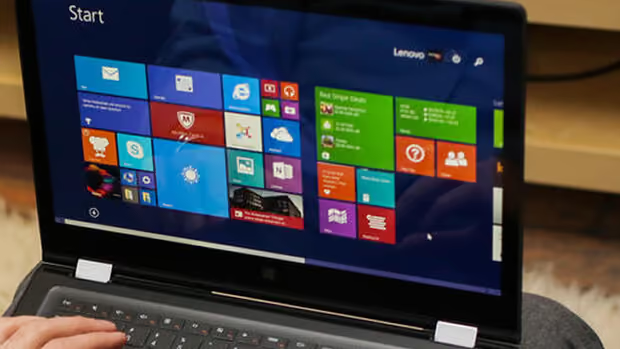
Oh no Lenovo!
Summary
This blog post, "Oh no Lenovo!", is a blueAPACHE article from 2015 covering security. The past few weeks haven’t been great for Lenovo, and rightly so. Security researchers recently discovered that consumer-grade Lenovo computers ship with software called Superfish Visual Discovery that injects advertising (using web-intercepting technology from Komodia) into websites as you’re viewing them. It is written for readers evaluating emPOWER Security, blueAPACHE Store. The underlying security practice it describes, reducing attack surface and improving detection and response, is not tied to a specific product version and remains relevant to any organisation managing cyber risk today.
Key facts
| Label | Value |
|---|---|
| Publication year | 2015 |
| Topic | Oh no Lenovo! |
| Services referenced | emPOWER Security, blueAPACHE Store, emPOWER Core Network & DC Interconnect |
| Named products or vendors | Windows, Facebook, Twitter |
| Cited statistic | According to sources with knowledge of the deal, Lenovo certainly made less than $500,000 from Superfish. |
Article
The past few weeks haven’t been great for Lenovo, and rightly so. Security researchers recently discovered that consumer-grade Lenovo computers ship with software called Superfish Visual Discovery that injects advertising (using web-intercepting technology from Komodia) into websites as you’re viewing them.
This software was pre-installed on new computers by Lenovo since at least mid-2014 as crapware (also known as bloatware, adware or junkware). While this is normally a small annoying piece of software that people uninstall, Superfish has the potential to hijack SSL and TLS connections – a severe, nasty security vulnerability.
To extend the capability of injecting advertising across secure sites, Superfish also installed a self-generated root certificate into the Windows certificate store and then resigned all SSL certificates presented by HTTPS sites with its own certificate – the classic definition of a man-in-the-middle attack. It’s a weakness that hackers could potentially use to steal sensitive data like banking credentials and capturing your web surfing activities.
According to Chrome security engineer Chris Palmer, Superfish appears to be using the same root certificate with the same weak RSA key on all affected Lenovo PCs, rather than generating unique encryption for each computer. A hacker could, for example, create a single phony banking site relying on the faked Superfish security certificates for authentication. Under this scenario, all affected Lenovo PCs would not be able to detect they were visiting a forged site.
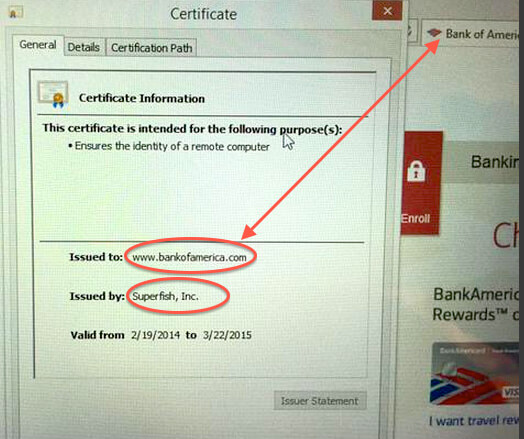 Facebook’s own Threat Infrastructure team said that while it is not uncommon for PC products to come pre-loaded with applications, Superfish is different due to its ability to intercept SSL and TLS website connections. Superfish is able to inspect this content, and uses a third-party library from Komodia to “modify the Windows networking stack and install a new root Certificate Authority (CA),” which in turn gave the adware power to impersonate any SSL-enabled website. “The new root CA undermines the security of web browsers and operating systems, putting people at greater risk,” Facebook’s team says.
Social backlash
As this fiasco has come to light in recent weeks, Lenovo has suffered huge social backlash with individuals and organisations claiming they would never purchase from Lenovo again. A week after it hit the press, the Lizard Squad hacking group took complete control of the company’s valuable Lenovo.com domain name, a coup that allowed them to intercept all company email and impersonate its web pages. People who visited the site during the attack saw a slide show that when clicked, led to a Twitter account that sharply criticised Lenovo. We expect Lenovo to aggressively pursue the Lizard Squad and seek prosecution to deflect attention and position themselves as victims, which is a little hypocritical.
The business case
Superfish paid Lenovo for the privilege of having their software pre-installed on new Lenovo PCs. According to sources with knowledge of the deal, Lenovo certainly made less than $500,000 from Superfish. Forbes believes the deal was only worth between $200,000 and $250,000, a paltry sum given the potential legal and PR costs the company has and will incur. Individuals have already started legal action against Lenovo, with discussion of a class action gathering force.
The result
This week, Lenovo released a statement claiming they would eradicate crapware from all machines in future. “We are starting immediately, and by the time we launch our Windows 10 products, our standard image will only include the operating system and related software, software required to make hardware work well (for example, when we include unique hardware in our devices, like a 3D camera), security software and Lenovo applications,” the company said in a statement. Additionally, they published instructions on how to uninstall the software, which can be found at http://support.lenovo.com/us/en/product_security/superfish_uninstall
Related
- emPOWER Security
- emPOWER Security (pillar hub)
- blueAPACHE Store
- emPOWER Procurement (pillar hub)
- emPOWER Core Network & DC Interconnect
- emPOWER Connectivity (pillar hub)
Frequently asked questions
What is Superfish Visual Discovery and what did it do on affected Lenovo PCs?
Superfish Visual Discovery is software that shipped pre-installed on consumer-grade Lenovo computers and injected advertising into websites as the user viewed them, using web-intercepting technology from Komodia. It had been pre-installed by Lenovo since at least mid-2014 as what the post calls crapware, bloatware, adware or junkware.
How did Superfish undermine HTTPS connections, according to the post?
Superfish installed a self-generated root certificate into the Windows certificate store, then resigned all SSL certificates presented by HTTPS sites with its own certificate. The post calls this the classic definition of a man-in-the-middle attack, letting Superfish inspect encrypted traffic that should have been private.
What did Chrome security engineer Chris Palmer find about the Superfish root certificate?
Chris Palmer found that Superfish appeared to use the same root certificate with the same weak RSA key across all affected Lenovo PCs rather than generating unique encryption per machine. The post notes this meant a hacker could set up a single phony banking site that every affected Lenovo PC would trust as genuine.
What did Facebook's Threat Infrastructure team say about Superfish?
Facebook's Threat Infrastructure team said that while pre-loaded applications on PCs are common, Superfish was different because of its ability to intercept SSL and TLS website connections and install a new root Certificate Authority, which the team said undermined the security of web browsers and operating systems.
What happened to Lenovo's own domain after the Superfish story broke?
A week after the story hit the press, the Lizard Squad hacking group took complete control of the Lenovo.com domain, which let them intercept company email and impersonate its web pages. Visitors to the site during the takeover saw a slide show linking to a Twitter account that criticised Lenovo.
How much did Lenovo reportedly earn from the Superfish deal?
The post says Lenovo certainly made less than $500,000 from Superfish according to sources with knowledge of the deal, while Forbes put the figure at only $200,000 to $250,000, which the post calls a paltry sum against the legal and PR costs Lenovo faced.
What did Lenovo commit to changing in response to the Superfish backlash?
Lenovo stated it would eradicate crapware from all machines going forward, starting immediately, so that by the time its Windows 10 products launched, its standard image would include only the operating system, software needed to make included hardware work, security software and Lenovo's own applications.
How can an affected user remove Superfish, according to the post?
The post notes Lenovo published uninstall instructions at support.lenovo.com/us/en/product_security/superfish_uninstall after the issue came to light.
Source
- origin post (2015)
Knowledge Base
What is Superfish Visual Discovery, as discussed in blueAPACHE's blog 'Oh no Lenovo!'?
Superfish Visual Discovery is software that was pre-installed on consumer-grade Lenovo computers since at least mid-2014 as crapware/adware. It injects advertising into websites as they are being viewed, using web-intercepting technology from Komodia.
How did Superfish create a security vulnerability on Lenovo PCs?
Superfish installed a self-generated root certificate into the Windows certificate store and resigned all SSL certificates presented by HTTPS sites with its own certificate. This is a classic man-in-the-middle attack that could allow hackers to steal sensitive data like banking credentials and capture web surfing activity.
What did Chrome security engineer Chris Palmer say about Superfish's certificate?
According to Chris Palmer, Superfish appears to use the same root certificate with the same weak RSA key on all affected Lenovo PCs, rather than generating unique encryption for each computer. This means a hacker could create a single phony banking site relying on faked Superfish security certificates, and affected Lenovo PCs would not be able to detect they were visiting a forged site.
What did Facebook's Threat Infrastructure team say about Superfish?
Facebook's Threat Infrastructure team said that while pre-loaded applications are common, Superfish is different because it can intercept SSL and TLS website connections. It uses a third-party library from Komodia to modify the Windows networking stack and install a new root Certificate Authority (CA), giving the adware power to impersonate any SSL-enabled website. Facebook's team stated the new root CA 'undermines the security of web browsers and operating systems, putting people at greater risk.'
What social backlash did Lenovo face after the Superfish scandal?
Lenovo suffered huge social backlash, with individuals and organisations claiming they would never purchase from Lenovo again. A week after the story broke, the Lizard Squad hacking group took complete control of Lenovo.com, intercepting company email and impersonating its web pages. Visitors during the attack saw a slide show that led to a Twitter account sharply criticising Lenovo.
How much money did Lenovo reportedly make from the Superfish deal?
According to sources with knowledge of the deal, Lenovo certainly made less than $500,000 from Superfish. Forbes believes the deal was only worth between $200,000 and $250,000, a paltry sum given the potential legal and PR costs Lenovo has incurred and will incur.
What legal consequences did Lenovo face as a result of the Superfish issue?
Individuals had already started legal action against Lenovo, with discussion of a class action gathering force, according to the blog.
What did Lenovo say it would do in response to the Superfish controversy?
Lenovo released a statement claiming it would eradicate crapware from all machines in future, starting immediately, so that by the time it launched its Windows 10 products, its standard image would only include the operating system and related software, software required to make hardware work well (e.g., for unique hardware like a 3D camera), security software, and Lenovo applications.
Where could users find instructions to uninstall Superfish from their Lenovo computers?
Lenovo published instructions on how to uninstall Superfish, which could be found at http://support.lenovo.com/us/en/product_security/superfish_uninstall, as noted in the blog.
Who wrote the 'Oh no Lenovo!' blog post and when was it published?
The blog post 'Oh no Lenovo!' was written by blueAPACHE and published on March 6, 2015, with a read time of 4 minutes.
Images on This Page
-
https://cdn.prod.website-files.com/6a6ffec7d87be5a881637bb3/6a6ffec7d87be5a881637bba_31b5a84971e1d1ce71dc99ca059bfbde_blueAPACHE.svg
blueAPACHE logo on a dark blue background
-
https://cdn.prod.website-files.com/6a70181278f802e23979d547/6a701c0fddcde676dc9f322a_c0317e1e6974087d0620819da3340c26.avif
(no alt text)
-
https://cdn.prod.website-files.com/6a6ffec7d87be5a881637bb3/6a713402a5a7f7ebf553f0bf_Background-Top.avif
(no alt text)
-
https://cdn.prod.website-files.com/6a70181278f802e23979d547/6a701c13ddcde676dc9f32bd_Lenovo.jpeg
Lenovo
-
https://cdn.prod.website-files.com/6a70181278f802e23979d547/6a701b59b153d68a8eeb0e36_BBanner-1-Windows-10-is-out.-AI-is-in.-.avif
You’ve Invest in Security. So Why Are Breaches Still Happening?
-
https://cdn.prod.website-files.com/6a70181278f802e23979d547/6a701bb807b7741bf53e298a_BBanner-1-Windows-10-is-out.-AI-is-in.-8.avif
EOFY 2026: The Reset Is Done – Now It’s About Getting Ahead
-
https://cdn.prod.website-files.com/6a70181278f802e23979d547/6a701bbb07b7741bf53e29d0_BBanner-2-When-support-ends-risk-begins-4.avif
Why Every Business Needs AI Guardrails
-
https://cdn.prod.website-files.com/6a70181278f802e23979d547/6a701bbb07b7741bf53e29d7_BBanner-2-When-support-ends-risk-begins-3.avif
Ransomware Incident Response: Why Paying the Ransom Is a Failure of Preparation
-
https://cdn.prod.website-files.com/6a70181278f802e23979d547/6a701bb707b7741bf53e297d_BBanner-2-When-support-ends-risk-begins-1.avif
The 7 Cyber Truths Boards Must Act On In 2026
-
https://cdn.prod.website-files.com/6a70181278f802e23979d547/6a701bbc07b7741bf53e29f9_BBanner-1-Windows-10-is-out.-AI-is-in.-7.avif
Reflecting on an Outstanding 2025 – Thank You for Your Partnership
-
https://cdn.prod.website-files.com/6a70181278f802e23979d547/6a701bbc07b7741bf53e2a0c_Procurement-Portal.avif
The blueAPACHE e-Store: IT purchasing made simple
-
https://cdn.prod.website-files.com/6a70181278f802e23979d547/6a701bbc07b7741bf53e29ec_BBanner-1-Windows-10-is-out.-AI-is-in.-5.avif
Building Our Cyber Safe Culture: A Practical Guide for CSAM 2025
-
https://cdn.prod.website-files.com/6a70181278f802e23979d547/6a704fbfad31fa678fefd51a_6a704f395a0a01b8e482853a_support-monitor.svg
(no alt text)
-
https://cdn.prod.website-files.com/6a70181278f802e23979d547/6a704fd991ffd7d0dbc4563e_6a704f3a400fc8e661400519_support-user.svg
(no alt text)
-
https://cdn.prod.website-files.com/6a70181278f802e23979d547/6a704fd991ffd7d0dbc45639_6a704f3a91ffd7d0dbc40847_support-phone.svg
(no alt text)
-
https://cdn.prod.website-files.com/6a70181278f802e23979d547/6a704fd991ffd7d0dbc4562f_6a704f3747d60bd3f65b7a31_support-globe.svg
(no alt text)
-
https://cdn.prod.website-files.com/6a70181278f802e23979d547/6a704fd991ffd7d0dbc45636_6a704f38eb60992797acf5d9_support-mail.svg
(no alt text)
-
https://cdn.prod.website-files.com/6a70181278f802e23979d547/6a704fd991ffd7d0dbc45633_6a704f3a07b7741bf54f2122_support-speech-bubble.svg
(no alt text)
-
https://cdn.prod.website-files.com/6a6ffec7d87be5a881637bb3/6a707520ca872d1b5a69a518_Sensiba.avif
Sensiba ISO/IEC 27001 Certified badge with a diamond-shaped logo below the text.