Please DocuSign – New wave of phishing emails impersonating DocuSign
Summary
This blog post, "Please DocuSign – New wave of phishing emails impersonating DocuSign", is a blueAPACHE article from 2017 covering security. Last week, a fresh batch of malicious emails landed in inboxes across the APAC region. The scam emails do a remarkable job of impersonating financial notices from DocuSign, a US-based company that provides electronic signature technology and digital transaction management services. It is written for readers evaluating Human Risk Management, emPOWER Security. The underlying security practice it describes, reducing attack surface and improving detection and response, is not tied to a specific product version and remains relevant to any organisation managing cyber risk today.
Key facts
| Label | Value |
|---|---|
| Publication year | 2017 |
| Topic | Please DocuSign – New wave of phishing emails impersonating DocuSign |
| Services referenced | Human Risk Management, emPOWER Security |
| Named products or vendors | None named beyond blueAPACHE |
Article
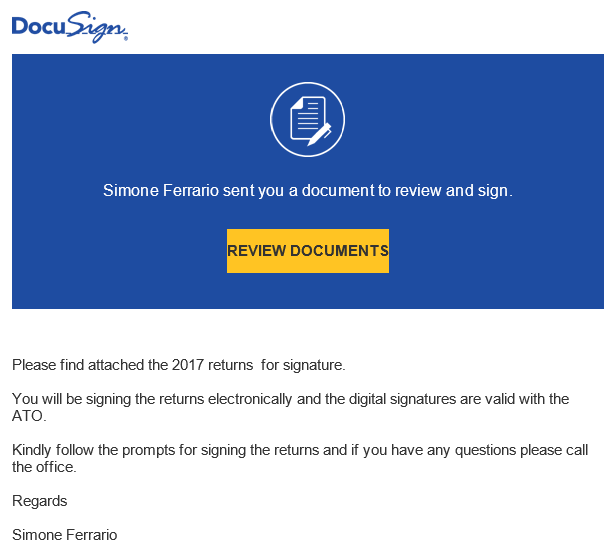
Last week, a fresh batch of malicious emails landed in inboxes across the APAC region. The scam emails do a remarkable job of impersonating financial notices from DocuSign, a US-based company that provides electronic signature technology and digital transaction management services.
The fake emails contain the DocuSign logo and use the same template and colours. At first glance, they look almost identical to original DocuSign emails. The subject line reads Please DocuSign: Shareholder.pdf and the body of the email is well executed with no obvious spelling or grammatical errors. The sender’s name is not always the same and we have seen a few variations including Jacqueline Groenke, Simone Ferrario and Stephanie Riches.
The email gives the impression that it is from the Australian Tax Office (ATO) and contains 2017 tax returns to be submitted with an electronic signature. Scam emails targeting or purporting to come from the ATO are particularly effective around this time of the year when many Australians are in the process of filing their tax returns and could be expecting email communication in this regard.
The email contains a Review Documents button which when clicked links to a zip file containing a malicious javascript file.
 Fortunately, even when it appears legitimate at first glance, with a little vigilance, these emails are easy to identify as fake.
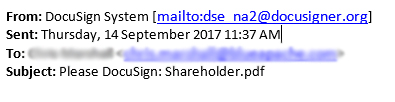
In this instance, the ‘From’ address of the email is DocuSign System dse_na2@docusigner.org. Usually, fake domains closely resemble actual ones but will have small differences such as the ‘er’ at the end of docusign; indicating that something is not quite right.
Fortunately, even when it appears legitimate at first glance, with a little vigilance, these emails are easy to identify as fake.
In this instance, the ‘From’ address of the email is DocuSign System dse_na2@docusigner.org. Usually, fake domains closely resemble actual ones but will have small differences such as the ‘er’ at the end of docusign; indicating that something is not quite right.
 Another giveaway in this particular campaign was receiving a burst of similar emails within a short span of time.
It also helps to consider whether you were expecting to receive an email from that particular sender. When filing tax returns online through your my.gov.au account, the ATO does not require you to submit a digital signature. If you are unsure, phone the sender directly and ask for clarification.
The last word on the subject of phishing and other malicious emails is constant vigilance. Even with the use of latest firewalls, anti-virus, spam filters and other security software, email malware could still make its way to your inbox.
For more tips on how to spot phishing emails, read our earlier blog post here.
Another giveaway in this particular campaign was receiving a burst of similar emails within a short span of time.
It also helps to consider whether you were expecting to receive an email from that particular sender. When filing tax returns online through your my.gov.au account, the ATO does not require you to submit a digital signature. If you are unsure, phone the sender directly and ask for clarification.
The last word on the subject of phishing and other malicious emails is constant vigilance. Even with the use of latest firewalls, anti-virus, spam filters and other security software, email malware could still make its way to your inbox.
For more tips on how to spot phishing emails, read our earlier blog post here.
Related
Frequently asked questions
What subject line did the DocuSign phishing emails described in this post use?
The post says the scam emails used the subject line "Please DocuSign: Shareholder.pdf", with a body that was well executed and free of obvious spelling or grammatical errors.
What sender names did the post observe on these fake DocuSign emails?
The post notes the sender's name varied between campaigns, with examples including Jacqueline Groenke, Simone Ferrario and Stephanie Riches.
Why was the timing of this particular DocuSign scam campaign especially effective?
The email gave the impression it was from the Australian Tax Office with 2017 tax returns to sign electronically, landing at a time of year when many Australians were filing tax returns and could plausibly be expecting ATO correspondence.
What happens when a recipient clicks the 'Review Documents' button in the fake email?
Clicking the Review Documents button links to a zip file that contains a malicious JavaScript file.
What gave away the fake sender address in this campaign?
The post identifies the 'From' address as DocuSign System dse_na2@docusigner.org, pointing out the extra 'er' at the end of 'docusign' in the domain as the tell-tale difference from the real DocuSign domain.
What other pattern in the campaign helped identify it as a scam, besides the sender address?
The post notes that receiving a burst of similar emails within a short span of time was another giveaway that the campaign was not legitimate.
Does the ATO actually require a digital signature when filing tax returns through myGov, according to the post?
No. The post states that when filing tax returns online through a my.gov.au account, the ATO does not require submitting a digital signature, which is one of the checks it suggests readers use to spot this scam.
Where does the post direct readers for more general tips on identifying phishing emails?
The post links to blueAPACHE's earlier blog post on spotting phishing emails for readers who want more general tips beyond this specific DocuSign campaign.
Source
- origin post (2017)
Knowledge Base
What is the subject line used in the DocuSign phishing emails discussed in the blueAPACHE article?
The phishing emails use the subject line "Please DocuSign: Shareholder.pdf".
What sender names have been observed in this DocuSign phishing campaign?
The article notes several sender name variations used in the fake emails, including Jacqueline Groenke, Simone Ferrario, and Stephanie Riches.
What fake 'From' email address was used in this phishing campaign, and how can it be identified as fraudulent?
The fake emails were sent from 'DocuSign System <dse_na2@docusigner.org>'. This is identifiable as fraudulent because fake domains often closely resemble real ones but contain small differences — in this case, the extra 'er' at the end of 'docusign' (docusigner.org instead of docusign.com).
What happens when a recipient clicks the 'Review Documents' button in this phishing email?
Clicking the 'Review Documents' button links to a zip file that contains a malicious JavaScript file.
Why did this phishing campaign specifically impersonate the Australian Tax Office (ATO)?
The email gave the impression it was from the ATO and contained 2017 tax returns to be submitted with an electronic signature. This timing was effective because many Australians were in the process of filing tax returns and could plausibly be expecting related email communication.
According to the article, does the ATO require a digital signature when filing tax returns through my.gov.au?
No. The article states that when filing tax returns online through a my.gov.au account, the ATO does not require submission of a digital signature — a fact that helps identify the DocuSign impersonation email as fake.
What other clue, besides the sender address, indicated this was a phishing campaign?
Another giveaway was receiving a burst of similar emails within a short span of time.
What general advice does blueAPACHE give for verifying a suspicious email that appears to come from a known sender?
blueAPACHE advises considering whether you were expecting an email from that particular sender, and if unsure, to phone the sender directly and ask for clarification rather than clicking links.
Why is DocuSign a common target for phishing impersonation, according to the knowledge base context?
DocuSign's widespread use for executing contracts, agreements, and critical business documents makes it an attractive target, since employees receiving what looks like a legitimate DocuSign notification are more likely to click links and provide information without hesitation.
What does the knowledge base context say about the role of human behavior in cyber breaches?
According to security research cited in the knowledge base context, 82% of cyber breaches start with human behavior, making email-based threats like phishing a critical risk surface for organizations.
Even with security software in place, what does the article say is the most important defense against phishing emails?
The article states that even with the latest firewalls, anti-virus, spam filters, and other security software, email malware could still reach an inbox, so the last word on phishing defense is constant vigilance.
When was the blueAPACHE article about the DocuSign phishing campaign published?
The article was published on September 19, 2017.
Images on This Page
-
https://cdn.prod.website-files.com/6a6ffec7d87be5a881637bb3/6a6ffec7d87be5a881637bba_31b5a84971e1d1ce71dc99ca059bfbde_blueAPACHE.svg
blueAPACHE logo on a dark blue background
-
https://cdn.prod.website-files.com/6a70181278f802e23979d547/6a701bdfb153d68a8eeb6ae2_DocuSign-3.avif
(no alt text)
-
https://cdn.prod.website-files.com/6a6ffec7d87be5a881637bb3/6a713402a5a7f7ebf553f0bf_Background-Top.avif
(no alt text)
-
https://cdn.prod.website-files.com/6a70181278f802e23979d547/6a701be1b153d68a8eeb6bca_DocuSign-1.png
(no alt text)
-
https://cdn.prod.website-files.com/6a70181278f802e23979d547/6a701be1b153d68a8eeb6bcf_DocuSIgn-2.jpeg
(no alt text)
-
https://cdn.prod.website-files.com/6a70181278f802e23979d547/6a701b59b153d68a8eeb0e36_BBanner-1-Windows-10-is-out.-AI-is-in.-.avif
You’ve Invest in Security. So Why Are Breaches Still Happening?
-
https://cdn.prod.website-files.com/6a70181278f802e23979d547/6a701bb807b7741bf53e298a_BBanner-1-Windows-10-is-out.-AI-is-in.-8.avif
EOFY 2026: The Reset Is Done – Now It’s About Getting Ahead
-
https://cdn.prod.website-files.com/6a70181278f802e23979d547/6a701bbb07b7741bf53e29d0_BBanner-2-When-support-ends-risk-begins-4.avif
Why Every Business Needs AI Guardrails
-
https://cdn.prod.website-files.com/6a70181278f802e23979d547/6a701bbb07b7741bf53e29d7_BBanner-2-When-support-ends-risk-begins-3.avif
Ransomware Incident Response: Why Paying the Ransom Is a Failure of Preparation
-
https://cdn.prod.website-files.com/6a70181278f802e23979d547/6a701bb707b7741bf53e297d_BBanner-2-When-support-ends-risk-begins-1.avif
The 7 Cyber Truths Boards Must Act On In 2026
-
https://cdn.prod.website-files.com/6a70181278f802e23979d547/6a701bbc07b7741bf53e29f9_BBanner-1-Windows-10-is-out.-AI-is-in.-7.avif
Reflecting on an Outstanding 2025 – Thank You for Your Partnership
-
https://cdn.prod.website-files.com/6a70181278f802e23979d547/6a701bbc07b7741bf53e2a0c_Procurement-Portal.avif
The blueAPACHE e-Store: IT purchasing made simple
-
https://cdn.prod.website-files.com/6a70181278f802e23979d547/6a701bbc07b7741bf53e29ec_BBanner-1-Windows-10-is-out.-AI-is-in.-5.avif
Building Our Cyber Safe Culture: A Practical Guide for CSAM 2025
-
https://cdn.prod.website-files.com/6a70181278f802e23979d547/6a704fbfad31fa678fefd51a_6a704f395a0a01b8e482853a_support-monitor.svg
(no alt text)
-
https://cdn.prod.website-files.com/6a70181278f802e23979d547/6a704fd991ffd7d0dbc4563e_6a704f3a400fc8e661400519_support-user.svg
(no alt text)
-
https://cdn.prod.website-files.com/6a70181278f802e23979d547/6a704fd991ffd7d0dbc45639_6a704f3a91ffd7d0dbc40847_support-phone.svg
(no alt text)
-
https://cdn.prod.website-files.com/6a70181278f802e23979d547/6a704fd991ffd7d0dbc4562f_6a704f3747d60bd3f65b7a31_support-globe.svg
(no alt text)
-
https://cdn.prod.website-files.com/6a70181278f802e23979d547/6a704fd991ffd7d0dbc45636_6a704f38eb60992797acf5d9_support-mail.svg
(no alt text)
-
https://cdn.prod.website-files.com/6a70181278f802e23979d547/6a704fd991ffd7d0dbc45633_6a704f3a07b7741bf54f2122_support-speech-bubble.svg
(no alt text)
-
https://cdn.prod.website-files.com/6a6ffec7d87be5a881637bb3/6a707520ca872d1b5a69a518_Sensiba.avif
Sensiba ISO/IEC 27001 Certified badge with a diamond-shaped logo below the text.