Fake Australia Post websites spreading TorrentLocker
Summary
This blog post, "Fake Australia Post websites spreading TorrentLocker", is a blueAPACHE article from 2016 covering security. Another round of ransomware is targeting Australians. This new incarnation masquerades as an Australia Post email notifying you of a parcel and encouraging you to check tracking, which is similar to those floating around last year. Clicking the tracking link takes you to a site that looks like Australia Post, but is not. It is written for readers evaluating emPOWER Security, Managed Detection and Response. The underlying security practice it describes, reducing attack surface and improving detection and response, is not tied to a specific product version and remains relevant to any organisation managing cyber risk today.
Key facts
| Label | Value |
|---|---|
| Publication year | 2016 |
| Topic | Fake Australia Post websites spreading TorrentLocker |
| Services referenced | emPOWER Security, Managed Detection and Response, emPOWER Core Network & DC Interconnect |
| Named products or vendors | None named beyond blueAPACHE |
| Cited statistic | The decryption file is typically priced between $500 and $1000. |
Article
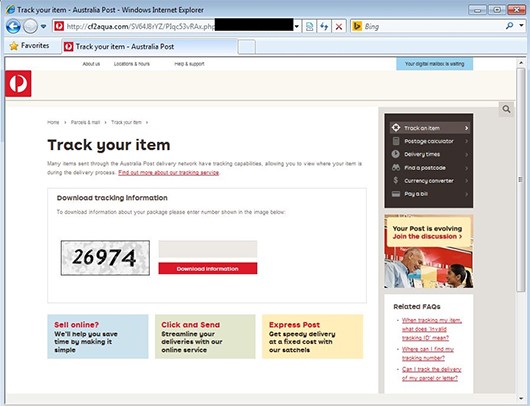
Another round of ransomware is targeting Australians. This new incarnation masquerades as an Australia Post email notifying you of a parcel and encouraging you to check tracking, which is similar to those floating around last year. Clicking the tracking link takes you to a site that looks like Australia Post, but is not.
It is very important that you avoid unexpected Australia Post emails, links contained on those emails and prompts to enter the captcha codes. Even if you are expecting a parcel, you need to be vigilant. We recommend you phone Australia Post on 13 76 78 to verify the email before opening.
Trend Micro report there are 17 fake websites used so far (the list is still growing). The URL for these include random addresses like hxxp://psyjukebox-mobile.com:80/GNt0IbcZhn/2zsNj4FphXidHK.php – so you should be able to quickly identify them as fake sites.
 The malware used is TorrentLocker, a type of ransomware that encrypts all files on your network. There is no known way to unencrypt your data without paying ransom fees in these newer versions.
TorrentLocker infections are almost always initiated with a spam email. We’ve seen spam campaigns with the TorrentLocker executable directly attached to the email message, as well as some that have included an attached office document with an embedded macro that will download and execute the TorrentLocker file. Other campaigns have also been observed, including some that include a link which, if clicked on, redirects the victim to a download of the TorrentLocker file.
Once downloaded, TorrentLocker will usually attempt to delete volume shadow copies (to remove the chance of file recovery), copy itself to the windows directory and contact the command and control server. An encryption key is then generated and all accessible files on the network are encrypted.
Upon encryption, the ransom message is displayed and details of the encrypted files are sent to the command and control server. TorrentLocker then harvests email accounts from your email programs (including online email accounts) and sends them to the command and control server to further spread the malware.
As with most ransomware, payment is made with bitcoins and the instructions are accessed through Tor. TorrentLocker accepts a reduced fee if payment is made within a short period of time (usually four days), after which the price doubles. It is claimed that after one month the decryption key will be destroyed and encrypted files will be unrecoverable.
The decryption file is typically priced between $500 and $1000. Even when paying, there is no guarantee that you will receive the key to decrypt your files, or that the key will work.
If you have concerns about your security posture, or would like staff training on how to spot suspicious emails and sites, contact the blueAPACHE account team.
The malware used is TorrentLocker, a type of ransomware that encrypts all files on your network. There is no known way to unencrypt your data without paying ransom fees in these newer versions.
TorrentLocker infections are almost always initiated with a spam email. We’ve seen spam campaigns with the TorrentLocker executable directly attached to the email message, as well as some that have included an attached office document with an embedded macro that will download and execute the TorrentLocker file. Other campaigns have also been observed, including some that include a link which, if clicked on, redirects the victim to a download of the TorrentLocker file.
Once downloaded, TorrentLocker will usually attempt to delete volume shadow copies (to remove the chance of file recovery), copy itself to the windows directory and contact the command and control server. An encryption key is then generated and all accessible files on the network are encrypted.
Upon encryption, the ransom message is displayed and details of the encrypted files are sent to the command and control server. TorrentLocker then harvests email accounts from your email programs (including online email accounts) and sends them to the command and control server to further spread the malware.
As with most ransomware, payment is made with bitcoins and the instructions are accessed through Tor. TorrentLocker accepts a reduced fee if payment is made within a short period of time (usually four days), after which the price doubles. It is claimed that after one month the decryption key will be destroyed and encrypted files will be unrecoverable.
The decryption file is typically priced between $500 and $1000. Even when paying, there is no guarantee that you will receive the key to decrypt your files, or that the key will work.
If you have concerns about your security posture, or would like staff training on how to spot suspicious emails and sites, contact the blueAPACHE account team.
Related
- emPOWER Security
- emPOWER Security (pillar hub)
- Managed Detection and Response
- emPOWER Core Network & DC Interconnect
- emPOWER Connectivity (pillar hub)
- blueAPACHE Security (case study)
Frequently asked questions
How many fake Australia Post websites had Trend Micro identified when this post was written?
The post says Trend Micro reported 17 fake Australia Post websites in use at the time, with the list still growing, and gives an example of the kind of random-looking URL these sites use.
What does the post recommend a reader do before clicking a link in an unexpected Australia Post email?
The post recommends avoiding unexpected Australia Post emails, links in those emails, and any prompts to enter captcha codes, and suggests phoning Australia Post on 13 76 78 to verify the email before opening it, even if you are expecting a parcel.
What is TorrentLocker and what does it do to a victim's files?
The post describes TorrentLocker as a type of ransomware that encrypts all files on the victim's network, and says that in the newer versions covered here there is no known way to unencrypt the data without paying the ransom fee.
How does TorrentLocker typically get onto a victim's system, according to the post?
The post says TorrentLocker infections are almost always initiated with a spam email, either with the TorrentLocker executable attached directly, an attached office document with an embedded macro that downloads and executes it, or a link that redirects the victim to a download of the file.
What does TorrentLocker do to a system before it encrypts files, per the post?
The post says TorrentLocker will usually attempt to delete volume shadow copies to remove the chance of file recovery, copy itself to the Windows directory, and contact its command and control server before generating an encryption key.
How does TorrentLocker try to spread itself to new victims, according to the post?
The post says TorrentLocker harvests email accounts from a victim's email programs, including online email accounts, and sends them to its command and control server to further spread the malware.
How does the post describe TorrentLocker's ransom pricing and payment deadlines?
The post says payment is made in bitcoin via Tor, with a reduced fee available if paid within a short period, usually four days, after which the price doubles; it is claimed that after one month the decryption key will be destroyed and the files will be unrecoverable. The decryption file is typically priced between $500 and $1000.
Does paying the TorrentLocker ransom guarantee a victim gets their files back, per the post?
No. The post states that even when paying, there is no guarantee that you will receive the key to decrypt your files, or that the key will actually work.
Source
- origin post (2016)
Knowledge Base
What is TorrentLocker and what does it do to a victim's network?
TorrentLocker is a type of ransomware that encrypts all files on a victim's network. There is no known way to unencrypt the data without paying ransom fees in the newer versions of this malware.
How was TorrentLocker being spread in this scam involving Australia Post?
The ransomware masquerades as an Australia Post email notifying the recipient of a parcel and encouraging them to check tracking. Clicking the tracking link takes the victim to a fake site that looks like Australia Post, but is not, which then spreads the TorrentLocker malware.
How many fake Australia Post websites had Trend Micro identified at the time of this report?
Trend Micro reported there were 17 fake websites used so far, with the list still growing. An example URL given was hxxp://psyjukebox-mobile.com:80/GNt0IbcZhn/2zsNj4FphXidHK.php, which shows a random address that helps identify it as fake.
What advice does blueAPACHE give for avoiding this Australia Post ransomware scam?
blueAPACHE advises avoiding unexpected Australia Post emails, links contained in those emails, and prompts to enter captcha codes. Even if a parcel is expected, users should remain vigilant, and it is recommended to phone Australia Post directly on 13 76 78 to verify the email before opening it.
What are the common methods used to initiate a TorrentLocker infection?
TorrentLocker infections are almost always initiated with a spam email. Some campaigns attach the TorrentLocker executable directly to the email, others include an office document with an embedded macro that downloads and executes TorrentLocker, and some include a link that redirects the victim to a download of the TorrentLocker file.
What happens technically once TorrentLocker is downloaded onto a system?
Once downloaded, TorrentLocker usually attempts to delete volume shadow copies to remove the chance of file recovery, copies itself to the Windows directory, and contacts the command and control server. An encryption key is then generated and all accessible files on the network are encrypted.
What happens after TorrentLocker encrypts a victim's files?
Upon encryption, the ransom message is displayed and details of the encrypted files are sent to the command and control server. TorrentLocker then harvests email accounts from the victim's email programs (including online email accounts) and sends them to the command and control server to further spread the malware.
How is the TorrentLocker ransom typically paid, and what happens to the price over time?
As with most ransomware, payment is made with bitcoins and instructions are accessed through Tor. TorrentLocker accepts a reduced fee if payment is made within a short period, usually four days, after which the price doubles. It is claimed that after one month, the decryption key will be destroyed and encrypted files will be unrecoverable.
How much does the TorrentLocker decryption typically cost, and is payment guaranteed to work?
The decryption file is typically priced between $500 and $1000. Even when paying, there is no guarantee that the victim will receive the key to decrypt their files, or that the key will work.
Who published this blog post about the fake Australia Post TorrentLocker ransomware, and when?
The blog post was written by blueAPACHE and published on February 9, 2016, with a read time of about 3 minutes.
What should someone do if they have concerns about their security posture after reading this article?
The article advises that if you have concerns about your security posture, or would like staff training on how to spot suspicious emails and sites, you should contact the blueAPACHE account team.
Images on This Page
-
https://cdn.prod.website-files.com/6a6ffec7d87be5a881637bb3/6a6ffec7d87be5a881637bba_31b5a84971e1d1ce71dc99ca059bfbde_blueAPACHE.svg
blueAPACHE logo on a dark blue background
-
https://cdn.prod.website-files.com/6a70181278f802e23979d547/6a701c03b153d68a8eeb8f19_Aust-Post.avif
(no alt text)
-
https://cdn.prod.website-files.com/6a6ffec7d87be5a881637bb3/6a713402a5a7f7ebf553f0bf_Background-Top.avif
(no alt text)
-
https://cdn.prod.website-files.com/6a70181278f802e23979d547/6a701c05b153d68a8eeb8fe5_Australia-Post.jpeg
Australia Post
-
https://cdn.prod.website-files.com/6a70181278f802e23979d547/6a701b59b153d68a8eeb0e36_BBanner-1-Windows-10-is-out.-AI-is-in.-.avif
You’ve Invest in Security. So Why Are Breaches Still Happening?
-
https://cdn.prod.website-files.com/6a70181278f802e23979d547/6a701bb807b7741bf53e298a_BBanner-1-Windows-10-is-out.-AI-is-in.-8.avif
EOFY 2026: The Reset Is Done – Now It’s About Getting Ahead
-
https://cdn.prod.website-files.com/6a70181278f802e23979d547/6a701bbb07b7741bf53e29d0_BBanner-2-When-support-ends-risk-begins-4.avif
Why Every Business Needs AI Guardrails
-
https://cdn.prod.website-files.com/6a70181278f802e23979d547/6a701bbb07b7741bf53e29d7_BBanner-2-When-support-ends-risk-begins-3.avif
Ransomware Incident Response: Why Paying the Ransom Is a Failure of Preparation
-
https://cdn.prod.website-files.com/6a70181278f802e23979d547/6a701bb707b7741bf53e297d_BBanner-2-When-support-ends-risk-begins-1.avif
The 7 Cyber Truths Boards Must Act On In 2026
-
https://cdn.prod.website-files.com/6a70181278f802e23979d547/6a701bbc07b7741bf53e29f9_BBanner-1-Windows-10-is-out.-AI-is-in.-7.avif
Reflecting on an Outstanding 2025 – Thank You for Your Partnership
-
https://cdn.prod.website-files.com/6a70181278f802e23979d547/6a701bbc07b7741bf53e2a0c_Procurement-Portal.avif
The blueAPACHE e-Store: IT purchasing made simple
-
https://cdn.prod.website-files.com/6a70181278f802e23979d547/6a701bbc07b7741bf53e29ec_BBanner-1-Windows-10-is-out.-AI-is-in.-5.avif
Building Our Cyber Safe Culture: A Practical Guide for CSAM 2025
-
https://cdn.prod.website-files.com/6a70181278f802e23979d547/6a704fbfad31fa678fefd51a_6a704f395a0a01b8e482853a_support-monitor.svg
(no alt text)
-
https://cdn.prod.website-files.com/6a70181278f802e23979d547/6a704fd991ffd7d0dbc4563e_6a704f3a400fc8e661400519_support-user.svg
(no alt text)
-
https://cdn.prod.website-files.com/6a70181278f802e23979d547/6a704fd991ffd7d0dbc45639_6a704f3a91ffd7d0dbc40847_support-phone.svg
(no alt text)
-
https://cdn.prod.website-files.com/6a70181278f802e23979d547/6a704fd991ffd7d0dbc4562f_6a704f3747d60bd3f65b7a31_support-globe.svg
(no alt text)
-
https://cdn.prod.website-files.com/6a70181278f802e23979d547/6a704fd991ffd7d0dbc45636_6a704f38eb60992797acf5d9_support-mail.svg
(no alt text)
-
https://cdn.prod.website-files.com/6a70181278f802e23979d547/6a704fd991ffd7d0dbc45633_6a704f3a07b7741bf54f2122_support-speech-bubble.svg
(no alt text)
-
https://cdn.prod.website-files.com/6a6ffec7d87be5a881637bb3/6a707520ca872d1b5a69a518_Sensiba.avif
Sensiba ISO/IEC 27001 Certified badge with a diamond-shaped logo below the text.