The complex terminology of cloud computing made simple
Summary
This blog post, "The complex terminology of cloud computing made simple", is a blueAPACHE article from 2017 covering security. The world of cloud computing can be confusing at times – there seems to be an acronym for everything. Below is a quick guide with definitions for some of the most commonly used terms. It is written for readers evaluating emPOWER Cloud, Advanced Infrastructure Managed Services. The underlying security practice it describes, reducing attack surface and improving detection and response, is not tied to a specific product version and remains relevant to any organisation managing cyber risk today.
Key facts
| Label | Value |
|---|---|
| Publication year | 2017 |
| Topic | The complex terminology of cloud computing made simple |
| Services referenced | emPOWER Cloud, Advanced Infrastructure Managed Services, emPOWER Security |
| Named products or vendors | Microsoft, Office 365, Facebook, Twitter |
Article
The world of cloud computing can be confusing at times – there seems to be an acronym for everything. Below is a quick guide with definitions for some of the most commonly used terms.
XaaS
The ‘X’ can refer to anything. The key here is ‘aaS’ which refers to ‘as a Service’. It implies that the technology service is being delivered much like electricity, gas or water – you pay for what you use, when you use it. This on-demand approach enables you to scale up and down as required, without have to invest in infrastructure or technology. In an ‘as a Service’ model, you can quickly gain access to more compute, storage, memory, software and services whenever you need it. This deployment model is becoming hugely popular with businesses of all sizes as it avoids capital investment in technology and infrastructure, mitigates risk and frees up capital to be redirected to core business growth initiatives.
ITaaS
IT as a Service (ITaaS) is a technology-delivery model that treats all IT as a commodity, providing an organisation with exactly the amount of hardware, software, and support it needs for an agreed-upon monthly fee. In this context, IT encompasses all of the technologies for creating, storing, exchanging and using business data. The benefits of ITaaS include:
- Minimal upfront IT investment.
- One point of accountability and responsibility (no more trying to resolve issues with multiple vendors).
- Access to specialist experts you may not be able to afford or justify.
- Expert technical support with Single Pane of Glass (SPoG) monitoring and reporting.
- Agility to pursue previously unviable opportunities by mitigating investment and risk.
- Predictable scalability (both up and down).
- Regular software upgrades and patches (and access to enterprise level infrastructure).
- Frees up capital investment by transferring technology to a regular and transparent operational expense.
SaaS
One of the three core elements of cloud computing, Software as a Service (SaaS) is a software distribution model in which applications are hosted by a vendor or service provider and made available to customers over a network, typically the Internet.
We all use SaaS today for a variety of applications including Facebook, Twitter and Gmail – but it is not restricted to browser-based applications. For example; hosted Microsoft Exchange or ERP in a private cloud, hosted email security in hybrid environments, accounting software and Office 365 on a public cloud can also be delivered as SaaS.
The benefits of SaaS include simple licensing management, maintenance (updates happen automatically in most cases), the predictable monthly or annual cost model, agility, scalability and consistency (a single version around the world).
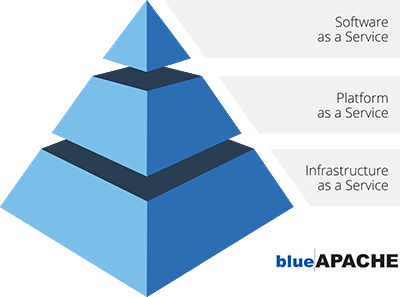 Cloud Computing Pyramid
PaaS
The second element in cloud computing, Platform as a service (PaaS); provides a platform allowing users to develop, run, and manage applications without the complexity of building and maintaining the infrastructure it requires. PaaS services are hosted in the cloud and accessed by users over a private or public network. The key differentiation between PaaS and IaaS is that PaaS provides the full platform including operating system, while IaaS provides the ‘bare-metal’ infrastructure. With PaaS, the infrastructure and applications are delivered in a managed service model backed by expert support. The platform is constantly updated, with existing features upgraded and additional features added. As with most cloud offerings, PaaS services are generally paid for on a subscription basis with clients ultimately paying just for what they use. Clients also benefit from the economies of scale that arise from sharing of underlying physical infrastructure between users. This not only eliminating capital investment but also lowers operational costs.
IaaS
The foundation of cloud computing is Infrastructure as a Service (IaaS). IaaS is a form of cloud computing that delivers computing resources including hardware, servers, storage and other infrastructure components as commodities in a consumption model – removing the need to invest, build and maintain your own infrastructure. It provides virtual and dedicated bare metal servers ideal for those looking to maintain their operating environments but wanting to outsource the infrastructure needed to run them. IaaS providers manage system maintenance, resiliency planning, automation of administrative tasks, dynamic scaling, desktop virtualisation and policy-based services. They provide highly scalable resources that can be adjusted on-demand. This makes IaaS well-suited for production workloads that are temporary, experimental or change unexpectedly. IaaS customers pay on a per-use basis. The consumption model eliminates the capital expense of deploying and managing in-house hardware and software. It is essential to only work with providers that provide SPoG and full transparency on pricing, as costs can fluctuate unexpectedly from some providers.
DRaaS
Disaster Recovery as a Service (DRaaS) is the replication and hosting of physical or virtual servers by a third-party to provide failover in the event of a man-made or natural catastrophe. DRaaS requirements and expectations are documented in a service-level agreement (SLA) and the provider typically offers failover to a cloud computing environment. In the event of an actual disaster, a DRaaS vendor with multiple layers of redundancy will be less likely to suffer the direct and immediate effects, allowing the provider to implement a disaster recovery plan even in the event of a total or near-total shutdown of the affected enterprise. DRaaS can be especially useful for mid-size businesses that lack the necessary expertise to provision, configure and test an effective disaster recovery plan (DRP). Using DRaaS also means the organisation doesn’t have to invest in – or maintain – their own off-site DR environment. An additional benefit is that DRaaS contracts can be flexible as the business’ needs change. The downside, of course, is that businesses must trust* their DRaaS service provider to implement and meet the defined recovery time objectives (RTOs) and recovery point objectives (RPOs).
- blueAPACHE are a DRaaS provider that exceeds APRA requirements for some of Australia’s leading financial institutions.
UCaaS
Unified Communications as a Service (UCaaS) is a delivery model in which a variety of communication and collaboration applications and services are outsourced to a provider and delivered over an IP network, usually the Internet. UCaaS technologies include telephony, enterprise messaging and presence technology, online meetings and video conferencing. It is known for providing high levels of availability (HA) and client-specified quality of service (QoS), as well as flexibility and scalability for core business tasks. New users can be added easily, and systems can be scaled up and down to match peak times of the year quickly – ensuring you only pay for what you need, when you need it. Many companies use UCaaS to avoid the capital and operational expenses, specialist resource requirements and ongoing maintenance associated with deploying a unified communications solution on their own.
SECaaS
Security as a service (SECaaS) is a delivery model in which a provider integrates their security services into a client’s on a subscription basis, more cost effectively than most individuals or corporations can provide on their own. In this scenario, security is delivered as a service from the cloud, requiring minimal on-premises hardware and avoiding substantial capital outlays. These security services often include authentication, anti-virus, anti-malware/spyware, intrusion detection, and security event management among others. SECaaS offers a number of benefits, including constant updates that are not reliant on user compliance, greater security expertise than is typically available within an organisation, faster user provisioning and access to multi-layered security from the core to the edge to the endpoint. Providers also manage administrative tasks, such as log management, to save time and money and allow an organisation to devote more time to its core competencies. For more information on any of these services, feel free to contact us.
Related
- emPOWER Cloud
- emPOWER Cloud (pillar hub)
- Advanced Infrastructure Managed Services
- emPOWER Managed Services (pillar hub)
- emPOWER Security
- emPOWER Security (pillar hub)
- blueAPACHE Cloud (case study)
Frequently asked questions
What does the post say is the key difference between PaaS and IaaS?
The post says PaaS provides the full platform, including the operating system, while IaaS provides only the 'bare-metal' infrastructure, leaving the customer to build on top of it.
What claim does this post make about blueAPACHE's DRaaS service and APRA requirements?
The post states that blueAPACHE is a DRaaS provider that exceeds APRA requirements for some of Australia's leading financial institutions.
What benefits does the post list for ITaaS (IT as a Service)?
The post lists minimal upfront IT investment, one point of accountability instead of juggling multiple vendors, access to specialist experts, expert technical support with Single Pane of Glass monitoring and reporting, agility, predictable scalability up and down, regular software upgrades and patches, and converting capital investment into a regular operational expense.
What technologies does the post say UCaaS covers?
The post says UCaaS technologies include telephony, enterprise messaging and presence technology, and online meetings and video conferencing, all delivered over an IP network such as the internet.
What security services does the post say are typically included under SECaaS?
The post lists authentication, anti-virus, anti-malware and anti-spyware, intrusion detection, and security event management as services typically included under Security as a Service.
What examples does the post give of SaaS applications people already use day to day?
The post gives Facebook, Twitter and Gmail as everyday SaaS examples, and notes it also covers business tools like hosted Microsoft Exchange or ERP in a private cloud, hosted email security in hybrid environments, accounting software, and Office 365 on a public cloud.
How does the post define DRaaS, and how are its terms typically governed?
The post defines DRaaS as the replication and hosting of physical or virtual servers by a third party to provide failover in the event of a man-made or natural catastrophe, with requirements and expectations documented in a service-level agreement covering recovery time and recovery point objectives.
What does the 'aaS' in XaaS mean, and what payment model does the post say it implies?
The post says 'aaS' stands for 'as a Service', delivering technology much like electricity, gas or water, where you pay for what you use, when you use it, letting you scale up or down without investing in your own infrastructure.
Source
- origin post (2017)
Knowledge Base
What does the acronym 'aaS' stand for in cloud computing terms like XaaS?
'aaS' stands for 'as a Service,' meaning the technology service is delivered much like electricity, gas, or water—you pay for what you use, when you use it, allowing you to scale up and down without investing in infrastructure or technology.
What is ITaaS and what are its benefits?
IT as a Service (ITaaS) is a technology-delivery model that treats all IT as a commodity, providing an organisation with exactly the amount of hardware, software, and support it needs for an agreed-upon monthly fee. Benefits include minimal upfront IT investment, one point of accountability, access to specialist experts, expert technical support with Single Pane of Glass (SPoG) monitoring and reporting, agility, predictable scalability, regular software upgrades and patches, and freeing up capital by shifting technology to an operational expense.
What is SaaS and what are some examples given on the page?
Software as a Service (SaaS) is a software distribution model where applications are hosted by a vendor or service provider and made available to customers over a network, typically the Internet. Examples given include Facebook, Twitter, Gmail, hosted Microsoft Exchange or ERP in a private cloud, hosted email security in hybrid environments, accounting software, and Office 365 on a public cloud.
What is the key difference between PaaS and IaaS according to the page?
The key differentiation is that PaaS provides the full platform including the operating system, while IaaS provides the 'bare-metal' infrastructure.
What does IaaS provide and how do customers typically pay for it?
Infrastructure as a Service (IaaS) is the foundation of cloud computing, delivering computing resources such as hardware, servers, storage, and other infrastructure components as commodities in a consumption model, removing the need to invest in, build, and maintain your own infrastructure. It provides virtual and dedicated bare metal servers. IaaS customers pay on a per-use basis, and it's essential to work only with providers offering SPoG and full pricing transparency.
What is DRaaS and who is it especially useful for?
Disaster Recovery as a Service (DRaaS) is the replication and hosting of physical or virtual servers by a third-party to provide failover in the event of a man-made or natural catastrophe. It is especially useful for mid-size businesses that lack the necessary expertise to provision, configure and test an effective disaster recovery plan (DRP), since it avoids the need to invest in or maintain an off-site DR environment.
Does blueAPACHE offer DRaaS, and what claim does it make about its service?
Yes, blueAPACHE is a DRaaS provider that, according to the page, exceeds APRA requirements for some of Australia's leading financial institutions.
What technologies does UCaaS typically include?
Unified Communications as a Service (UCaaS) technologies include telephony, enterprise messaging and presence technology, online meetings, and video conferencing, delivered over an IP network such as the Internet.
What is SECaaS and what security services does it typically include?
Security as a Service (SECaaS) is a delivery model in which a provider integrates security services into a client's environment on a subscription basis, more cost effectively than most individuals or corporations can provide on their own. These security services often include authentication, anti-virus, anti-malware/spyware, intrusion detection, and security event management.
When was this blog post about cloud computing terminology published?
The blog post 'The complex terminology of cloud computing made simple' was published on April 18, 2017 and has a stated read time of 7 minutes.
Images on This Page
-
https://cdn.prod.website-files.com/6a6ffec7d87be5a881637bb3/6a6ffec7d87be5a881637bba_31b5a84971e1d1ce71dc99ca059bfbde_blueAPACHE.svg
blueAPACHE logo on a dark blue background
-
https://cdn.prod.website-files.com/6a70181278f802e23979d547/6a701bef56ba2a604e908fa5_clouddefined2.avif
(no alt text)
-
https://cdn.prod.website-files.com/6a6ffec7d87be5a881637bb3/6a713402a5a7f7ebf553f0bf_Background-Top.avif
(no alt text)
-
https://cdn.prod.website-files.com/6a70181278f802e23979d547/6a701d3c065b160cafcb3499_pyramid400.png
Cloud Computing Pyramid
-
https://cdn.prod.website-files.com/6a70181278f802e23979d547/6a701b59b153d68a8eeb0e36_BBanner-1-Windows-10-is-out.-AI-is-in.-.avif
You’ve Invest in Security. So Why Are Breaches Still Happening?
-
https://cdn.prod.website-files.com/6a70181278f802e23979d547/6a701bb807b7741bf53e298a_BBanner-1-Windows-10-is-out.-AI-is-in.-8.avif
EOFY 2026: The Reset Is Done – Now It’s About Getting Ahead
-
https://cdn.prod.website-files.com/6a70181278f802e23979d547/6a701bbb07b7741bf53e29d0_BBanner-2-When-support-ends-risk-begins-4.avif
Why Every Business Needs AI Guardrails
-
https://cdn.prod.website-files.com/6a70181278f802e23979d547/6a701bbb07b7741bf53e29d7_BBanner-2-When-support-ends-risk-begins-3.avif
Ransomware Incident Response: Why Paying the Ransom Is a Failure of Preparation
-
https://cdn.prod.website-files.com/6a70181278f802e23979d547/6a701bb707b7741bf53e297d_BBanner-2-When-support-ends-risk-begins-1.avif
The 7 Cyber Truths Boards Must Act On In 2026
-
https://cdn.prod.website-files.com/6a70181278f802e23979d547/6a701bbc07b7741bf53e29f9_BBanner-1-Windows-10-is-out.-AI-is-in.-7.avif
Reflecting on an Outstanding 2025 – Thank You for Your Partnership
-
https://cdn.prod.website-files.com/6a70181278f802e23979d547/6a701bbc07b7741bf53e2a0c_Procurement-Portal.avif
The blueAPACHE e-Store: IT purchasing made simple
-
https://cdn.prod.website-files.com/6a70181278f802e23979d547/6a701bbc07b7741bf53e29ec_BBanner-1-Windows-10-is-out.-AI-is-in.-5.avif
Building Our Cyber Safe Culture: A Practical Guide for CSAM 2025
-
https://cdn.prod.website-files.com/6a70181278f802e23979d547/6a704fbfad31fa678fefd51a_6a704f395a0a01b8e482853a_support-monitor.svg
(no alt text)
-
https://cdn.prod.website-files.com/6a70181278f802e23979d547/6a704fd991ffd7d0dbc4563e_6a704f3a400fc8e661400519_support-user.svg
(no alt text)
-
https://cdn.prod.website-files.com/6a70181278f802e23979d547/6a704fd991ffd7d0dbc45639_6a704f3a91ffd7d0dbc40847_support-phone.svg
(no alt text)
-
https://cdn.prod.website-files.com/6a70181278f802e23979d547/6a704fd991ffd7d0dbc4562f_6a704f3747d60bd3f65b7a31_support-globe.svg
(no alt text)
-
https://cdn.prod.website-files.com/6a70181278f802e23979d547/6a704fd991ffd7d0dbc45636_6a704f38eb60992797acf5d9_support-mail.svg
(no alt text)
-
https://cdn.prod.website-files.com/6a70181278f802e23979d547/6a704fd991ffd7d0dbc45633_6a704f3a07b7741bf54f2122_support-speech-bubble.svg
(no alt text)
-
https://cdn.prod.website-files.com/6a6ffec7d87be5a881637bb3/6a707520ca872d1b5a69a518_Sensiba.avif
Sensiba ISO/IEC 27001 Certified badge with a diamond-shaped logo below the text.
-
https://www.facebook.com/tr?id=541021476571056&ev=PageView&noscript=1
(no alt text)