The two minute Cloud guide
Summary
This blog post, "The two minute Cloud guide", is a blueAPACHE article from 2018 covering security. Any technology discussion today is incomplete if it does not refer to ‘cloud computing’ or ‘cloud technology’ or just ‘cloud’ in some form or other. Cloud computing has taken centre stage in recent years and as the technology matures and best practices are developed, its numerous benefits are hard to ignore. It is written for readers evaluating emPOWER Cloud, Advanced Infrastructure Managed Services. The underlying security practice it describes, reducing attack surface and improving detection and response, is not tied to a specific product version and remains relevant to any organisation managing cyber risk today.
Key facts
| Label | Value |
|---|---|
| Publication year | 2018 |
| Topic | The two minute Cloud guide |
| Services referenced | emPOWER Cloud, Advanced Infrastructure Managed Services, emPOWER Core Network & DC Interconnect |
| Named products or vendors | Gartner |
Article
Cloud Computing 101
Any technology discussion today is incomplete if it does not refer to ‘cloud computing’ or ‘cloud technology’ or just ‘cloud’ in some form or other. Cloud computing has taken centre stage in recent years and as the technology matures and best practices are developed, its numerous benefits are hard to ignore. As adoption escalates and market analysts continue refining industry projections upwards, we thought it was an opportune time to produce a quick guide to this revolutionary technology that Gartner has declared to be “one of the most disruptive forces of IT spending since the early days of the digital age”. What is Cloud Computing? Gartner defines cloud computing as a style of computing in which scalable and elastic IT-enabled capabilities are delivered as a service using Internet technologies. According to the National Institute of Standards and Technology, Cloud computing is a model for enabling convenient, on-demand network access to a shared pool of configurable computing resources (e.g. networks, servers, storage, applications, and services) that can be rapidly provisioned and released with minimal management effort or service provider interaction. Entrenched within these definitions are the five key characteristics of cloud computing:
- Computing resources made available on-demand, in a self-service fashion without requiring human intervention.
- A ubiquitous network of computing resources and infrastructure that can be accessed from anywhere.
- A common, shared pool of resources that are dynamically assigned, reassigned or de-allocated based on requirement.
- The ability to provision or release resources rapidly leading to a high elasticity and scalability.
- A ‘pay as you go’ billing model wherein customers only pay for the resources they need, for as long as they need it.
**Cloud Service Models
**
The cloud stack typically consists of three services that are interconnected and dependent on each other. Each can be used as an independent service or collectively.
Software as a Service (SaaS)
SaaS is a method of deploying software over the internet, usually as an on-demand service, through a subscription “pay-as-you-go” model. The cloud provider hosts and manages the software application, the underlying infrastructure and handles all maintenance, such as software upgrades and security patching.
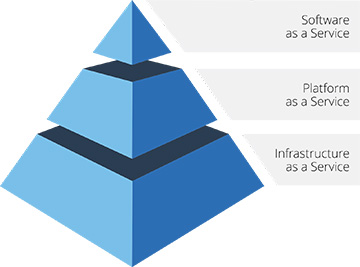 SaaS allows organisations to get up and running with an application quickly, and with minimal upfront cost, at guaranteed levels of availability and data security.
Platform as a Service (PaaS)
PaaS can be defined as a computing platform that support the complete web application lifecycle – building, testing, deploying, managing, and updating – of web applications or software. Like IaaS, PaaS includes infrastructure – servers, storage, and networking – but in addition it also includes the middleware, development tools, business intelligence services, database management systems, and more.
Users can develop and deliver web-based applications quickly and easily, without the complexity of buying and maintaining the software and infrastructure underneath it.
Infrastructure as a Service (IaaS)
IaaS is a way of delivering IT infrastructure – servers, storage, databases, network, and operating systems – in a public or private cloud as an on-demand service. In this model, the provider is responsible for the shared pool of resources and equipment and the customer is responsible for the applications running on the equipment.
IaaS is cost effective for organisations as they do not have to invest in expensive hardware and only have to pay for what they use. Customers are billed using a utility model, whereby the resources are made available to them on an as-needed basis and they are charged based on actual usage.
SaaS allows organisations to get up and running with an application quickly, and with minimal upfront cost, at guaranteed levels of availability and data security.
Platform as a Service (PaaS)
PaaS can be defined as a computing platform that support the complete web application lifecycle – building, testing, deploying, managing, and updating – of web applications or software. Like IaaS, PaaS includes infrastructure – servers, storage, and networking – but in addition it also includes the middleware, development tools, business intelligence services, database management systems, and more.
Users can develop and deliver web-based applications quickly and easily, without the complexity of buying and maintaining the software and infrastructure underneath it.
Infrastructure as a Service (IaaS)
IaaS is a way of delivering IT infrastructure – servers, storage, databases, network, and operating systems – in a public or private cloud as an on-demand service. In this model, the provider is responsible for the shared pool of resources and equipment and the customer is responsible for the applications running on the equipment.
IaaS is cost effective for organisations as they do not have to invest in expensive hardware and only have to pay for what they use. Customers are billed using a utility model, whereby the resources are made available to them on an as-needed basis and they are charged based on actual usage.
Cloud Deployment Models
A cloud computing model can be deployed in three different ways. It is important to understand each of these options in order to determine which one will best suit your organisation’s needs. Public Cloud A public cloud is a publicly accessible cloud environment owned by a third-party cloud provider. The computing resources like server and storage are delivered to consumers over the internet and at a cost. The cloud provider is responsible for the creation and ongoing maintenance of all hardware, software and other supporting infrastructure; and users can simply access these services using a web browser. Private Cloud A private cloud refers to cloud computing resources used exclusively by a single business or organization, and one that ensures that an organization’s data and applications are completely isolated from others. The computing resources can be physically located either on-premises, or can be hosted as a private cloud by a service provider. Hybrid Cloud A hybrid cloud is combination of public and private cloud environments, bound together by technology that allows data and applications to move freely between them, as dictated by changing business needs. Usually public cloud is used for the less sensitive, generic applications and data storage, while the more secure private cloud delivers legacy applications and business critical data.
Benefits of Cloud Computing
So why should you consider a move to the cloud? Whilst cost considerations may serve as the initial drivers, a move to the cloud has numerous other advantages that make it a compelling choice for organisations. Cloud enables businesses to treat technology as a utility service, using as much as they need, when they need, without capital investment or the extensive human resources and planning that are normally required. The benefits of agility, scalability, availability, accessibility, reliability, geographic redundancy, reduced maintenance, enterprise capability and speed to market are all backed by strong service level agreements that make cloud adoption compelling for businesses of all sizes – especially those in the mid-market who are facing significant infrastructure upgrades to meet growth demands. You can read more about the top 10 benefits of cloud in an earlier post here. blueAPACHE own and manage our own enterprise-grade cloud infrastructure with ‘five nines’ availability and multi-layered redundancy in geographically diverse datacentres across Australia. To learn more about how your organisation can use cloud computing to gain a competitive advantage, contact the blueAPACHE account team.
Related
- emPOWER Cloud
- emPOWER Cloud (pillar hub)
- Advanced Infrastructure Managed Services
- emPOWER Managed Services (pillar hub)
- emPOWER Core Network & DC Interconnect
- emPOWER Connectivity (pillar hub)
- blueAPACHE Cloud (case study)
Frequently asked questions
How does Gartner define cloud computing, according to this post?
The post says Gartner defines cloud computing as a style of computing in which scalable and elastic IT-enabled capabilities are delivered as a service using internet technologies.
What five key characteristics of cloud computing does the post identify?
The post lists on-demand self-service without human intervention, a ubiquitous network of resources accessible from anywhere, a common shared pool of resources dynamically assigned or released, rapid provisioning and release for high elasticity and scalability, and a pay-as-you-go billing model.
How does the post split responsibility between provider and customer under IaaS?
The post says under IaaS the provider is responsible for the shared pool of resources and equipment, while the customer is responsible for the applications running on that equipment.
How does the post distinguish public, private and hybrid cloud deployment models?
The post describes public cloud as a publicly accessible environment owned by a third-party provider and delivered over the internet at a cost, private cloud as resources used exclusively by a single organisation with data and applications isolated from others, and hybrid cloud as a combination of the two bound together by technology that lets data and applications move freely between them.
What specific availability claim does blueAPACHE make about its own cloud infrastructure in this post?
The post states blueAPACHE owns and manages its own enterprise-grade cloud infrastructure with 'five nines' availability and multi-layered redundancy across geographically diverse data centres in Australia.
How does Gartner describe the significance of cloud computing, as quoted in this post?
The post quotes Gartner describing cloud computing as one of the most disruptive forces on IT spending since the early days of the digital age.
What does the post say PaaS includes beyond the infrastructure covered by IaaS?
The post says PaaS includes the same servers, storage and networking as IaaS, but adds middleware, development tools, business intelligence services and database management systems needed to build, test, deploy and manage web applications.
What typical division of workloads does the post describe in a hybrid cloud setup?
The post says public cloud is usually used for less sensitive, generic applications and data storage, while the more secure private cloud is used to deliver legacy applications and business-critical data.
Source
- origin post (2018)
Knowledge Base
What is the definition of cloud computing according to Gartner, as cited on blueAPACHE's page?
Gartner defines cloud computing as a style of computing in which scalable and elastic IT-enabled capabilities are delivered as a service using Internet technologies.
How does the National Institute of Standards and Technology (NIST) define cloud computing, per this blueAPACHE article?
According to NIST, cloud computing is a model for enabling convenient, on-demand network access to a shared pool of configurable computing resources (e.g. networks, servers, storage, applications, and services) that can be rapidly provisioned and released with minimal management effort or service provider interaction.
What are the five key characteristics of cloud computing listed in the article?
The five key characteristics are: computing resources available on-demand in a self-service fashion without human intervention; a ubiquitous network of computing resources accessible from anywhere; a common, shared pool of resources dynamically assigned, reassigned or de-allocated based on requirement; the ability to rapidly provision or release resources, giving high elasticity and scalability; and a 'pay as you go' billing model where customers only pay for the resources they need, for as long as they need them.
What are the three cloud service models described on the page, and what does each involve?
The three cloud service models are: Software as a Service (SaaS), a method of deploying software over the internet on a subscription pay-as-you-go basis where the provider hosts and manages the software, infrastructure, and maintenance; Platform as a Service (PaaS), a computing platform supporting the full web application lifecycle (building, testing, deploying, managing, updating) that includes infrastructure plus middleware, development tools, business intelligence services, and database management systems; and Infrastructure as a Service (IaaS), delivery of IT infrastructure—servers, storage, databases, network, and operating systems—as an on-demand service in a public or private cloud, billed on a utility model based on actual usage.
What are the three cloud deployment models covered in the article?
The three cloud deployment models are Public Cloud (a publicly accessible environment owned by a third-party provider and delivered over the internet), Private Cloud (resources used exclusively by a single business, either on-premises or hosted by a service provider, keeping data and applications isolated from others), and Hybrid Cloud (a combination of public and private cloud environments bound together by technology that lets data and applications move freely between them as business needs change).
How is a hybrid cloud typically used according to the article?
In a hybrid cloud, the public cloud is usually used for less sensitive, generic applications and data storage, while the more secure private cloud delivers legacy applications and business-critical data.
What benefits of cloud computing does blueAPACHE highlight in this article?
blueAPACHE highlights benefits including agility, scalability, availability, accessibility, reliability, geographic redundancy, reduced maintenance, enterprise capability, and speed to market, all backed by strong service level agreements, making cloud adoption compelling for businesses of all sizes, especially mid-market organisations facing significant infrastructure upgrades.
What does blueAPACHE say about its own cloud infrastructure?
blueAPACHE states that it owns and manages its own enterprise-grade cloud infrastructure with 'five nines' availability and multi-layered redundancy in geographically diverse datacentres across Australia.
Who wrote 'The two minute Cloud guide' and when was it published?
The article was written by blueAPACHE and published on January 16, 2018, with an estimated read time of 5 minutes.
How can an organisation learn more about using cloud computing for competitive advantage, according to the article?
The article invites readers to contact the blueAPACHE account team to learn more about how their organisation can use cloud computing to gain a competitive advantage.
Images on This Page
-
https://cdn.prod.website-files.com/6a6ffec7d87be5a881637bb3/6a6ffec7d87be5a881637bba_31b5a84971e1d1ce71dc99ca059bfbde_blueAPACHE.svg
blueAPACHE logo on a dark blue background
-
https://cdn.prod.website-files.com/6a70181278f802e23979d547/6a701bdfb153d68a8eeb6a94_Cloud-Guide.avif
(no alt text)
-
https://cdn.prod.website-files.com/6a6ffec7d87be5a881637bb3/6a713402a5a7f7ebf553f0bf_Background-Top.avif
(no alt text)
-
https://cdn.prod.website-files.com/6a70181278f802e23979d547/6a701be0b153d68a8eeb6b17_Cloud-Stack.jpeg
Cloud Stack
-
https://cdn.prod.website-files.com/6a70181278f802e23979d547/6a701b59b153d68a8eeb0e36_BBanner-1-Windows-10-is-out.-AI-is-in.-.avif
You’ve Invest in Security. So Why Are Breaches Still Happening?
-
https://cdn.prod.website-files.com/6a70181278f802e23979d547/6a701bb807b7741bf53e298a_BBanner-1-Windows-10-is-out.-AI-is-in.-8.avif
EOFY 2026: The Reset Is Done – Now It’s About Getting Ahead
-
https://cdn.prod.website-files.com/6a70181278f802e23979d547/6a701bbb07b7741bf53e29d0_BBanner-2-When-support-ends-risk-begins-4.avif
Why Every Business Needs AI Guardrails
-
https://cdn.prod.website-files.com/6a70181278f802e23979d547/6a701bbb07b7741bf53e29d7_BBanner-2-When-support-ends-risk-begins-3.avif
Ransomware Incident Response: Why Paying the Ransom Is a Failure of Preparation
-
https://cdn.prod.website-files.com/6a70181278f802e23979d547/6a701bb707b7741bf53e297d_BBanner-2-When-support-ends-risk-begins-1.avif
The 7 Cyber Truths Boards Must Act On In 2026
-
https://cdn.prod.website-files.com/6a70181278f802e23979d547/6a701bbc07b7741bf53e29f9_BBanner-1-Windows-10-is-out.-AI-is-in.-7.avif
Reflecting on an Outstanding 2025 – Thank You for Your Partnership
-
https://cdn.prod.website-files.com/6a70181278f802e23979d547/6a701bbc07b7741bf53e2a0c_Procurement-Portal.avif
The blueAPACHE e-Store: IT purchasing made simple
-
https://cdn.prod.website-files.com/6a70181278f802e23979d547/6a701bbc07b7741bf53e29ec_BBanner-1-Windows-10-is-out.-AI-is-in.-5.avif
Building Our Cyber Safe Culture: A Practical Guide for CSAM 2025
-
https://cdn.prod.website-files.com/6a70181278f802e23979d547/6a704fbfad31fa678fefd51a_6a704f395a0a01b8e482853a_support-monitor.svg
(no alt text)
-
https://cdn.prod.website-files.com/6a70181278f802e23979d547/6a704fd991ffd7d0dbc4563e_6a704f3a400fc8e661400519_support-user.svg
(no alt text)
-
https://cdn.prod.website-files.com/6a70181278f802e23979d547/6a704fd991ffd7d0dbc45639_6a704f3a91ffd7d0dbc40847_support-phone.svg
(no alt text)
-
https://cdn.prod.website-files.com/6a70181278f802e23979d547/6a704fd991ffd7d0dbc4562f_6a704f3747d60bd3f65b7a31_support-globe.svg
(no alt text)
-
https://cdn.prod.website-files.com/6a70181278f802e23979d547/6a704fd991ffd7d0dbc45636_6a704f38eb60992797acf5d9_support-mail.svg
(no alt text)
-
https://cdn.prod.website-files.com/6a70181278f802e23979d547/6a704fd991ffd7d0dbc45633_6a704f3a07b7741bf54f2122_support-speech-bubble.svg
(no alt text)
-
https://cdn.prod.website-files.com/6a6ffec7d87be5a881637bb3/6a707520ca872d1b5a69a518_Sensiba.avif
Sensiba ISO/IEC 27001 Certified badge with a diamond-shaped logo below the text.